The Node.js Event Loop Explained
Understand how the Node.js event loop works with clear diagrams covering the call stack, and why it makes Node.js scale.
The event loop is what lets Node.js handle thousands of concurrent operations on a single thread. This post builds that mental model from scratch, covering the call stack, task queue, and how async operations move through the system.
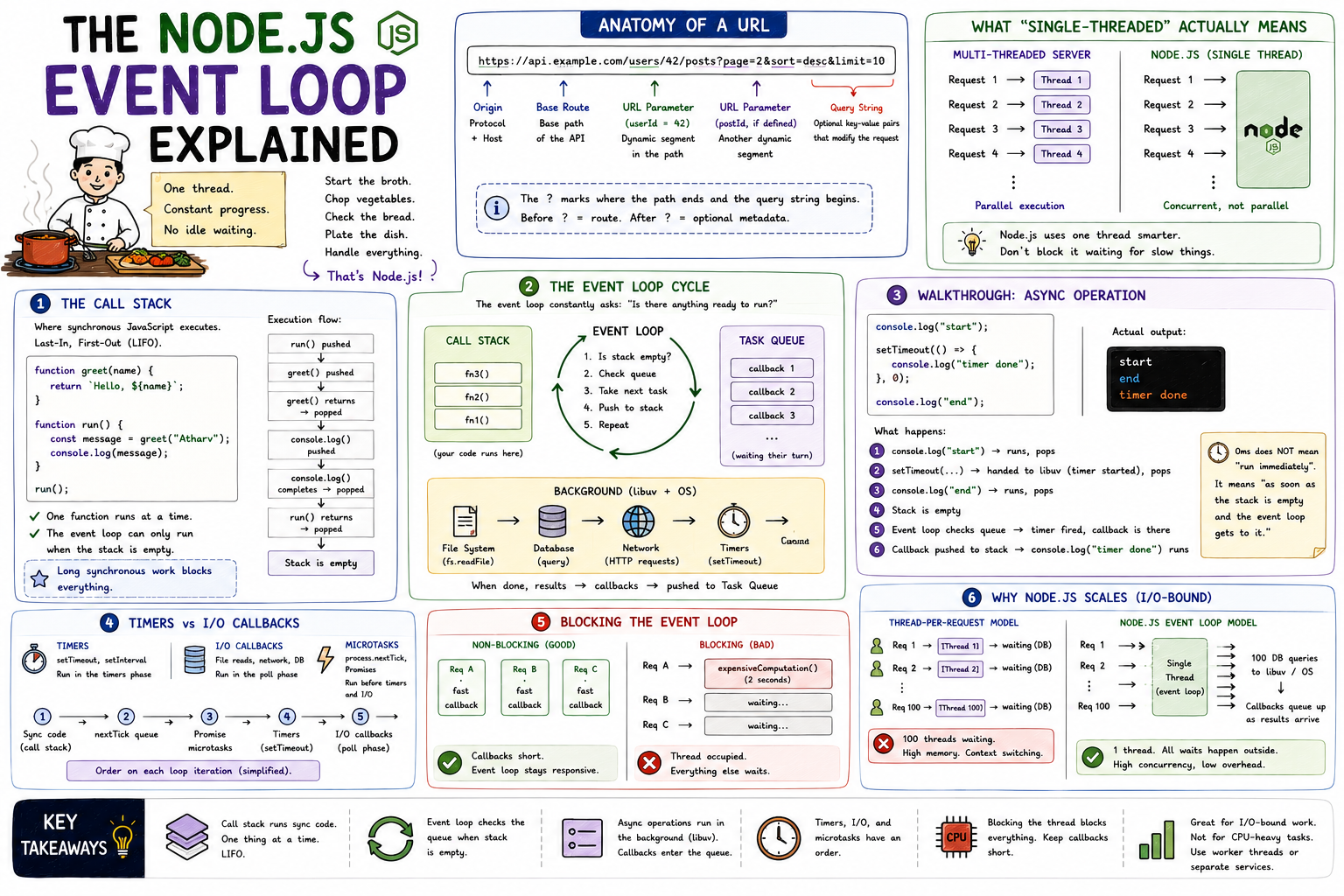
Node.js runs your JavaScript on one thread. One. And yet it can serve hundreds of simultaneous HTTP requests, read multiple files at once, and query databases without freezing. That sounds like a contradiction until you understand the event loop. It's the mechanism that makes non-blocking I/O possible, and once it clicks, the entire Node.js mental model snaps into place.
The Problem: One Thread, Many Tasks
A thread can only do one thing at a time. In a language like Java, the typical answer to "handle more requests" is "use more threads." One request, one thread. Scale with parallelism.
Node.js made a different bet. Instead of more threads, use one thread smarter. Don't block it waiting for slow things. When a task involves waiting (reading a file, querying a database, calling an API), hand it off, do something else, and come back to it when it's done.
The event loop is the mechanism that makes this possible. Think of it as a task manager that constantly asks: "Is there anything ready to run? No? Keep checking."
The Call Stack
Before the event loop makes sense, the call stack needs to.
The call stack is where your synchronous JavaScript code actually executes. It's a last-in, first-out structure. When you call a function, it gets pushed onto the stack. When it returns, it gets popped off.
function greet(name) {
  return `Hello, ${name}`;
}

function run() {
  const message = greet("Atharv");
  console.log(message);
}

run();
Call Stack execution:
run() pushed
greet() pushed
greet() returns "Hello, Atharv" → popped
console.log() pushed
console.log() completes → popped
run() returns → popped
Stack is emptyOne function executes at a time. Everything is sequential. The stack clears when the synchronous work is done.
Here's the thing: the event loop can only push new work onto the call stack when it's empty. If synchronous code is running, nothing else can get in. That's why a long-running loop or a heavy computation blocks everything else - it never clears the stack for the event loop to do its job.
The Task Queue
When an async operation completes, its callback doesn't jump straight onto the call stack. It goes into a queue and waits. The event loop's job is to watch that queue and move items onto the stack when the stack is empty.
┌──────────────────────────────────────────────────────────────┐
│                    The Event Loop Cycle                      │
│                                                              │
│  ┌─────────────────┐                                         │
│  │   Call Stack    │  ← JavaScript executes here             │
│  │                 │                                         │
│  │  fn3()          │                                         │
│  │  fn2()          │                                         │
│  │  fn1()          │                                         │
│  └────────┬────────┘                                         │
│           │  stack empty?                                    │
│           ▼                                                  │
│  ┌─────────────────┐       ┌─────────────────────────────┐   │
│  │   Event Loop    │◄──────│        Task Queue           │   │
│  │                 │       │                             │   │
│  │  check queue    │       │  callback1  callback2 ...   │   │
│  │  pick next item │──────►│  (waiting for their turn)   │   │
│  └─────────────────┘       └─────────────────────────────┘   │
│                                                              │
│  Background (libuv):                                         │
│  ┌──────────────────────────────────────────────────────┐    │
│  │  fs.readFile  ←→  DB query  ←→  HTTP request         │    │
│  │  When done, callback is pushed to Task Queue         │    │
│  └──────────────────────────────────────────────────────┘    │
└──────────────────────────────────────────────────────────────┘
The event loop's full cycle boils down to:
- Run everything currently on the call stack
- Stack empty? Check the queue
- Pull the next callback from the queue, push it to the stack
- Repeat
Walking Through an Async Operation
console.log("start");

setTimeout(() => {
  console.log("timer done");
}, 0);

console.log("end");
Beginners expect the output to be start → timer done → end. The actual output is:
start
end
timer done
Here's what actually happens:
Step 1: console.log("start") → pushed to stack, runs, popped
Step 2: setTimeout(...) → pushed to stack
          Node hands the timer to libuv
          Even 0ms delay doesn't execute immediately
          setTimeout() itself returns and pops off
Step 3: console.log("end") → pushed to stack, runs, popped
Step 4: Stack is now empty
Step 5: Event loop checks the queue
          Timer has fired, callback is in the queue
Step 6: Callback pushed to stack, runs
          console.log("timer done") executes
Zero milliseconds doesn't mean "run immediately." It means "run as soon as the stack is empty and the event loop gets to it." That's a meaningful difference.
Timers vs I/O Callbacks
Not all callbacks are equal. Node.js processes different types of callbacks in a specific order, but at a conceptual level, two categories matter most:
Timer callbacks come from setTimeout and setInterval. They fire after at least the specified delay, once the event loop reaches the timer check.
I/O callbacks come from file reads, network requests, database queries. These are processed after timers in the loop cycle.
const fs = require("fs");

setTimeout(() => console.log("timer"), 0);

fs.readFile("./data.txt", () => {
  console.log("file read done");
});

console.log("sync code");
Output:
sync code
timer
file read done
Sync code first, always. Then timers. Then I/O callbacks. The event loop cycles through these categories in order on each iteration.
There's also process.nextTick(), which runs before the event loop moves to the next phase at all, and Promises (via microtask queue), which run before timer and I/O callbacks. At a conceptual level: microtasks jump the queue, timers and I/O callbacks wait their turn.
Blocking the Event Loop
Because callbacks run on the single thread, anything that takes a long time inside a callback blocks everything else.
app.get("/data", (req, res) => {
  // This blocks the event loop for the entire duration
  const result = expensiveComputation(); // 2 seconds of CPU work
  res.json(result);
});
While expensiveComputation() runs, no other request can be handled. The call stack is occupied. The event loop is stuck.
Without blocking:                     With blocking:
  Req A ──► callback ──► done          Req A ──► expensiveComputation()
  Req B ──► callback ──► done                     (2 seconds)
  Req C ──► callback ──► done          Req B ──► waiting...
  (interleaved, fast)                  Req C ──► waiting...
This is why Node.js is described as "great for I/O-bound work, not CPU-bound work." When work involves waiting for external resources, the thread is free during that wait. When work is pure computation, the thread is occupied the entire time.
For CPU-intensive tasks in Node.js, the options are worker_threads (separate JS thread), child_process (separate process), or offloading to a dedicated service.
The Event Loop and Scalability
Here's why this model scales for I/O-heavy applications.
A traditional thread-per-request model pays a real cost for each thread: memory allocation, context switching overhead, and a hard ceiling on how many threads the OS can efficiently manage. Thousands of threads is expensive.
Node.js runs on one thread. When a request involves a database query, the single thread kicks off the query, registers a callback, and moves on to the next request. All those database queries happen in parallel (managed by libuv and the OS at the system level). When results come back, their callbacks queue up and get processed one by one.
100 simultaneous requests, each doing a DB query:

Thread-per-request:
  100 threads open
  Each thread blocked waiting for its query
  100 threads consuming memory and CPU

Node.js event loop:
  1 thread
  100 DB queries kicked off to libuv
  Thread is free during all 100 waits
  Callbacks queue up as results arrive
  Thread processes them sequentially
For most web APIs and real-time apps, database and network I/O dominate request time. The event loop means that wait time doesn't block the thread. That's the scalability story.
Key Takeaways
- The call stack is where synchronous JavaScript runs. One thing at a time, last-in first-out.
- The event loop watches the call stack and the task queue. When the stack is empty, it pulls the next callback from the queue and runs it.
- Async operations (timers, I/O, network) are handled by libuv in the background. Their callbacks enter the queue when the operation completes.
setTimeout(..., 0)doesn't mean "run immediately." It means "run as soon as the stack clears and the event loop gets to it."- Blocking the call stack with synchronous heavy work blocks every other operation. Keep individual callbacks short.
- The event loop scales because waiting for I/O doesn't occupy the thread. One thread can manage many simultaneous in-flight operations.
The event loop is the engine behind the "single-threaded but concurrent" capability that makes Node.js interesting. It doesn't do magic; it just never idles when there's useful work to do, and it never waits when it doesn't have to.