Handling File Uploads in Express with Multer
Learn how multer handles multipart/form-data in Express. Covers single and multiple file uploads, file validation, and serving uploaded files.
File uploads arrive at your server in a format called multipart/form-data that Express can't parse on its own. Multer is the middleware that bridges that gap. This post covers how multer works, how to handle single and multiple files, and how to configure storage.
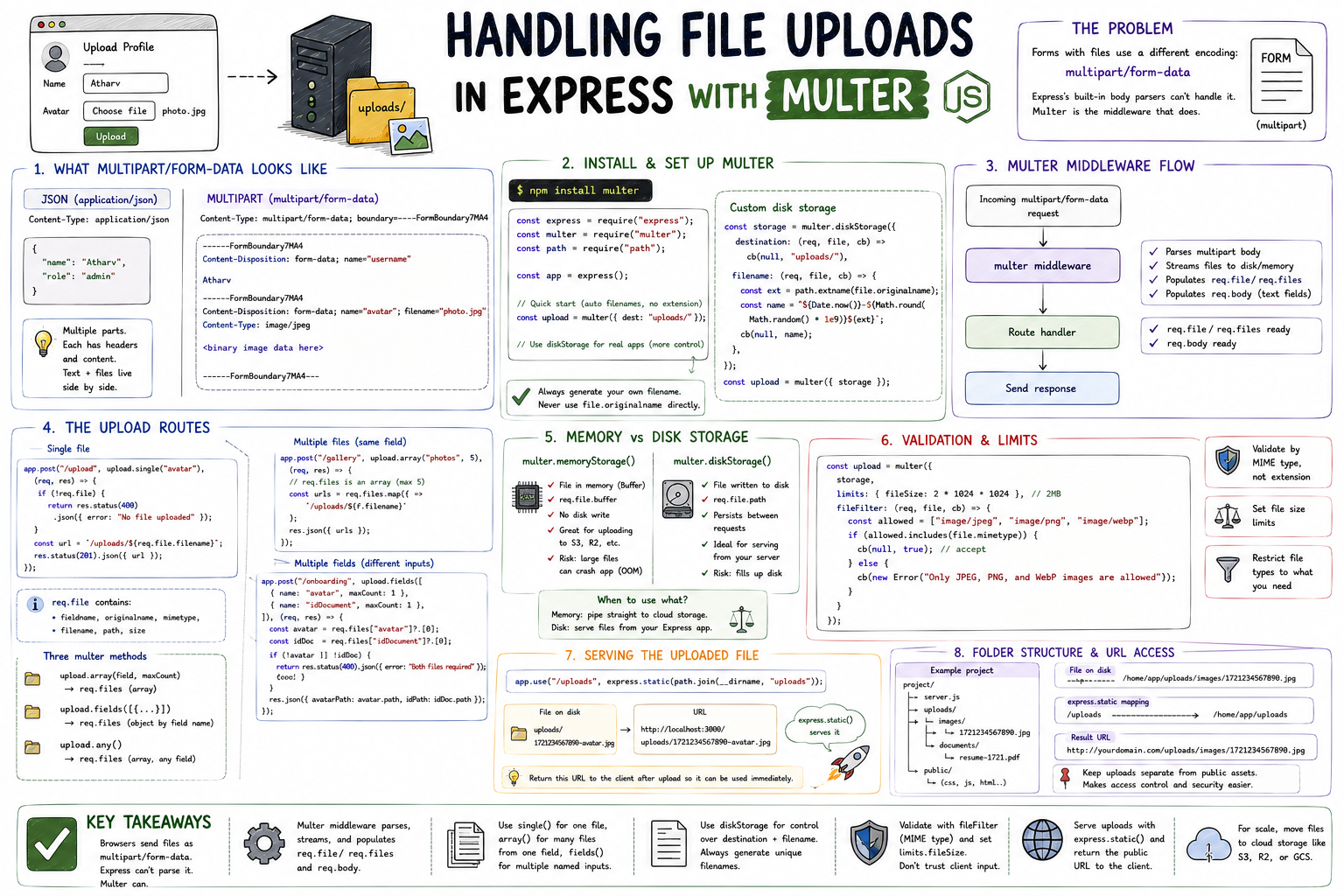
When a user submits a form with a text field, the browser packages the data as a simple key-value string. When that same form has a file input, the browser switches to a completely different encoding format: multipart/form-data. It splits the request into multiple parts, each with its own headers and content. Express's built-in body parsers don't know what to do with that format. That's exactly the problem multer solves.
What Multipart/Form-Data Looks Like
A standard JSON body is clean and flat:
Content-Type: application/json
{ "name": "Atharv", "role": "admin" }
A multipart request looks like this under the hood:
Content-Type: multipart/form-data; boundary=----FormBoundary7MA4

------FormBoundary7MA4
Content-Disposition: form-data; name="username"

Atharv
------FormBoundary7MA4
Content-Disposition: form-data; name="avatar"; filename="photo.jpg"
Content-Type: image/jpeg

<binary image data here>
------FormBoundary7MA4--
Each part has its own headers and content. Text fields and files live side by side. Parsing this correctly, streaming the binary parts to disk or memory, requires dedicated middleware. That's multer.
Installing and Setting Up Multer
npm install multerThe simplest possible setup uses memory storage, where files are held in a Buffer in RAM:
const express = require("express");
const multer = require("multer");

const app = express();
const upload = multer({ dest: "uploads/" }); // files go to uploads/ folder
dest is the quick-start option. It saves files to disk with auto-generated filenames (no extension). For anything beyond prototyping, use diskStorage for control.
Multer Middleware Execution Flow
Multer integrates into Express as route-level middleware. It runs between the incoming request and your route handler:
┌────────────────────────────────────────────────────────────┐
│                    Request Lifecycle                       │
│                                                            │
│  Client sends multipart/form-data                          │
│          │                                                 │
│          ▼                                                 │
│  ┌───────────────┐                                         │
│  │    multer     │  ← parses multipart body                │
│  │  middleware   │    streams file to disk or memory       │
│  │               │    populates req.file / req.files       │
│  └──────┬────────┘    populates req.body (text fields)     │
│         │                                                  │
│         ▼                                                  │
│  ┌───────────────┐                                         │
│  │ Route Handler │  ← req.file and req.body ready to use   │
│  └───────────────┘                                         │
└────────────────────────────────────────────────────────────┘
Text fields from the multipart form go to req.body. Files go to req.file (single) or req.files (multiple). Without multer, both would be missing entirely.
Handling a Single File Upload
upload.single(fieldName) processes one file from the named input field:
const storage = multer.diskStorage({
  destination: (req, file, cb) => cb(null, "uploads/"),
  filename: (req, file, cb) => {
    const ext = path.extname(file.originalname);
    cb(null, `${Date.now()}-${file.fieldname}${ext}`);
  },
});

const upload = multer({ storage });

app.post("/profile/avatar", upload.single("avatar"), (req, res) => {
  console.log(req.file);
  // {
  //   fieldname: 'avatar',
  //   originalname: 'photo.jpg',
  //   mimetype: 'image/jpeg',
  //   filename: '1721234567890-avatar.jpg',
  //   path: 'uploads/1721234567890-avatar.jpg',
  //   size: 204800
  // }

  if (!req.file) {
    return res.status(400).json({ error: "No file provided" });
  }

  res.status(201).json({
    message: "Avatar uploaded",
    path: req.file.path,
  });
});
req.file is undefined if the client didn't include a file, so always check for it.
Handling Multiple File Uploads
Three multer methods handle different multi-file scenarios:
// Multiple files from one field (max 5)
upload.array("photos", 5);
// req.files → array of file objects

// Multiple files from different fields
upload.fields([
  { name: "avatar", maxCount: 1 },
  { name: "gallery", maxCount: 4 },
]);
// req.files → object keyed by field name
// req.files['avatar'][0], req.files['gallery'][0..3]

// Accept any files regardless of field name
upload.any();
// req.files → array, each has a fieldname property
In practice, upload.array() handles gallery or batch uploads, and upload.fields() handles forms with distinct file inputs (avatar + ID document, for example):
app.post(
  "/onboarding",
  upload.fields([
    { name: "avatar", maxCount: 1 },
    { name: "idDocument", maxCount: 1 },
  ]),
  (req, res) => {
    const avatar = req.files["avatar"]?.[0];
    const idDoc = req.files["idDocument"]?.[0];

    if (!avatar || !idDoc) {
      return res.status(400).json({ error: "Both files required" });
    }

    res.json({
      avatarPath: avatar.path,
      idPath: idDoc.path,
    });
  },
);
Memory Storage vs Disk Storage
Multer offers two storage engines:
┌─────────────────────────┬─────────────────────────────┐
│    multer.memoryStorage │    multer.diskStorage       │
├─────────────────────────┼─────────────────────────────┤
│ File stored in Buffer   │ File written to disk        │
│ req.file.buffer exists  │ req.file.path exists        │
│ No disk write           │ Persists between requests   │
│ Good for cloud uploads  │ Good for local serving      │
│ Risk: large files OOM   │ Risk: disk space            │
└─────────────────────────┴─────────────────────────────┘
Memory storage is useful when you plan to immediately forward the file elsewhere, like streaming it to S3. The buffer is right there in memory, no extra file read needed. Disk storage is the default choice when you're serving files from your own server.
Adding File Validation
Multer lets you filter incoming files before they're saved:
const upload = multer({
  storage,
  limits: { fileSize: 2 * 1024 * 1024 }, // 2MB
  fileFilter: (req, file, cb) => {
    const allowed = ["image/jpeg", "image/png", "image/webp"];
    if (allowed.includes(file.mimetype)) {
      cb(null, true); // accept
    } else {
      cb(null, false); // silently reject
      // or cb(new Error('Invalid file type')) to throw
    }
  },
});
limits.fileSize cuts off the upload stream before an oversized file reaches disk. fileFilter runs before storage and can accept or reject based on MIME type, field name, or any logic you need.
Serving the Uploaded File
Once saved to disk, make the file accessible with express.static:
app.use("/uploads", express.static(path.join(__dirname, "uploads")));A file saved to uploads/1721234567890-avatar.jpg becomes available at:
http://localhost:3000/uploads/1721234567890-avatar.jpgReturn this URL in your upload response and the client can use it immediately.
Key Takeaways
- Browsers send files as
multipart/form-data, a format Express can't parse without middleware. - Multer intercepts multipart requests, streams files to disk or memory, and populates
req.fileandreq.files. - Use
upload.single()for one file,upload.array()for multiple files from one field,upload.fields()for files across multiple named inputs. diskStoragegives you control over filename and destination. Always generate your own filename: never usefile.originalnamedirectly.- Validate with
fileFilter(MIME type) andlimits.fileSizebefore files reach storage. - Memory storage is useful when forwarding to cloud storage. Disk storage is the default for local file serving.
Multer's API is small but covers every realistic upload scenario. Once you understand the middleware flow and which method maps to which use case, the rest is just configuration.