Blocking vs Non-Blocking Code in Node.js
Learn the difference between blocking and non-blocking code in Node.js, and DB calls keep your server responsive.
Blocking code makes your server wait, doing nothing, until an operation finishes. Non-blocking code hands the work off and keeps going. In a single-threaded environment like Node.js, that distinction determines how your server performs under real load.
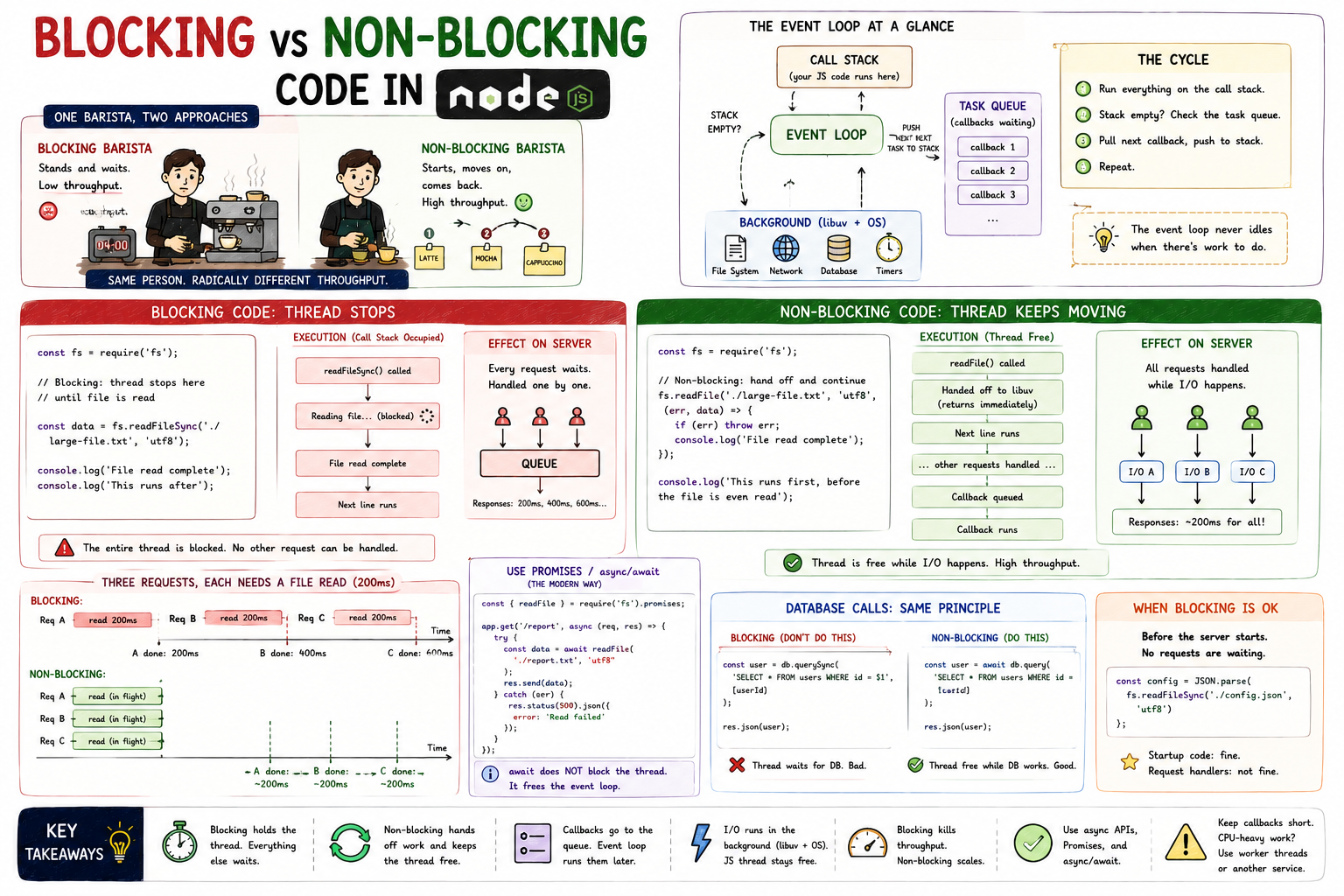
Imagine a coffee shop with one barista. A customer orders a latte - 4 minutes of steaming and frothing. A blocking barista stands at the machine and stares at it for the full 4 minutes before taking the next order. A non-blocking barista starts the milk steaming, takes two more orders, begins another drink, and comes back when the first is ready. Same one person. Radically different throughput. That's the entire blocking vs non-blocking story in one image.
What Blocking Code Is
Blocking code holds the thread until the operation completes. Nothing else can happen on that thread in the meantime. In Node.js, where there's only one thread for JavaScript execution, this means the entire server pauses.
const fs = require("fs");

// Blocking: thread stops here until file is read
const data = fs.readFileSync("./large-file.txt", "utf8");
console.log("File read complete");
console.log("This runs after");
readFileSync is synchronous. The thread opens the file, reads every byte, and only then moves to the next line. The execution order is completely predictable - that's its one advantage.
What Non-Blocking Code Is
Non-blocking code initiates an operation and immediately returns control to the event loop. When the operation eventually completes, a callback (or a resolved Promise) runs.
const fs = require("fs");

// Non-blocking: thread hands off and continues immediately
fs.readFile("./large-file.txt", "utf8", (err, data) => {
  if (err) throw err;
  console.log("File read complete");
});

console.log("This runs first, before the file is even read");
The output here surprises most beginners:
This runs first, before the file is even read
File read complete
readFile kicks off the I/O operation, registers the callback, and returns immediately. The thread moves on. When the OS finishes reading the file, Node.js queues the callback and runs it when the call stack is free.
Why Blocking Slows Servers
On a server, blocking code means every request that arrives while the thread is occupied has to wait.
Blocking execution: 3 requests arrive, each needing a file read

Time ──────────────────────────────────────────────────────►

[Req A - file read 200ms ][Req B - file read 200ms][Req C - file read 200ms]

Req A response: 200ms
Req B response: 400ms  ← waited for A to finish
Req C response: 600ms  ← waited for A and B to finish
The server handles requests serially. Response time compounds. Under real load with dozens of concurrent requests, this collapses quickly.
Non-blocking changes the picture entirely:
Non-blocking execution: 3 requests arrive, each needing a file read

Time ──────────────────────────────────────────────────────►

[Req A - read kicks off]
[Req B - read kicks off]
[Req C - read kicks off]
...all three file reads happen concurrently in the OS...
[A callback][B callback][C callback]

Req A response: ~200ms
Req B response: ~200ms
Req C response: ~200ms
All three file reads run concurrently at the OS level. The single JavaScript thread is free the entire time they're in flight. When results arrive, callbacks queue up and get processed in order.
File Read: Blocking vs Non-Blocking Side by Side
// BLOCKING - don't use in a server context
app.get("/report", (req, res) => {
  const data = fs.readFileSync("./report.txt", "utf8"); // thread stops here
  res.send(data);
});

// NON-BLOCKING - correct approach
app.get("/report", (req, res) => {
  fs.readFile("./report.txt", "utf8", (err, data) => {
    if (err) return res.status(500).json({ error: "Read failed" });
    res.send(data);
  });
});
In the blocking version, every request to /report parks the thread for the full file read duration. In the non-blocking version, the thread registers the file read and is immediately available for the next request.
The modern approach uses the Promise-based fs.promises API, which works cleanly with async/await:
const { readFile } = require("fs").promises;

app.get("/report", async (req, res) => {
  try {
    const data = await readFile("./report.txt", "utf8");
    res.send(data);
  } catch (err) {
    res.status(500).json({ error: "Read failed" });
  }
});
await here doesn't block the thread. It suspends the current async function and returns control to the event loop. When the file read completes, execution resumes from where it left off. Looks synchronous, behaves non-blocking.
Database Calls: The Most Common Real-World Case
The same principle applies to every I/O operation, and database queries are the most frequent one in production code.
// BLOCKING equivalent (hypothetical - don't do this)
const user = db.querySync("SELECT * FROM users WHERE id = $1", [userId]);
res.json(user);

// NON-BLOCKING - what every real DB client does
const user = await db.query("SELECT * FROM users WHERE id = $1", [userId]);
res.json(user);
Every popular database client for Node.js (pg, mongoose, prisma) is async by design. The query goes out over the network, the thread is free, and the response comes back as a resolved Promise. You get the result when it arrives, not by waiting for it.
When Blocking Code Is Acceptable
Not all blocking code is wrong. It depends on context.
Startup code is fine. Reading a config file synchronously before the server starts, loading environment variables, parsing a schema - these run once before the server accepts connections. Nothing is waiting.
// Fine at startup, not in a request handler
const config = JSON.parse(fs.readFileSync("./config.json", "utf8"));
The rule: blocking is acceptable when no other requests are waiting. The moment your server is live and handling traffic, any blocking operation in a request handler is a bottleneck.
Key Takeaways
- Blocking code holds the thread until the operation finishes. In Node.js, that freezes the entire server for that duration.
- Non-blocking code hands the operation off, registers a callback, and keeps the thread free to handle other requests.
- Response time compounds under blocking: three 200ms file reads become 200ms, 400ms, 600ms for concurrent requests. Non-blocking keeps all three at ~200ms.
- Use callback-based APIs, Promises, or
async/awaitfor any I/O: file reads, database queries, HTTP calls. awaitdoes not block the thread. It suspends the async function and frees the event loop.- Blocking at server startup (before accepting traffic) is fine. Blocking inside request handlers is not.
Blocking vs non-blocking isn't an abstract concept. It's the difference between a server that handles ten requests per second and one that handles ten thousand. Node.js gives you the tools to do it right - the choice of which API you reach for is what determines whether you use them.