REST API Design Made Simple with Express.js
Learn how to design a REST API in Express.js using resources, HTTP methods, proper route naming, and status codes.
REST is a set of conventions for designing APIs that are predictable, consistent, and easy to work with. This post covers what REST means, how it maps to HTTP, and how to build a clean resource-based API in Express.
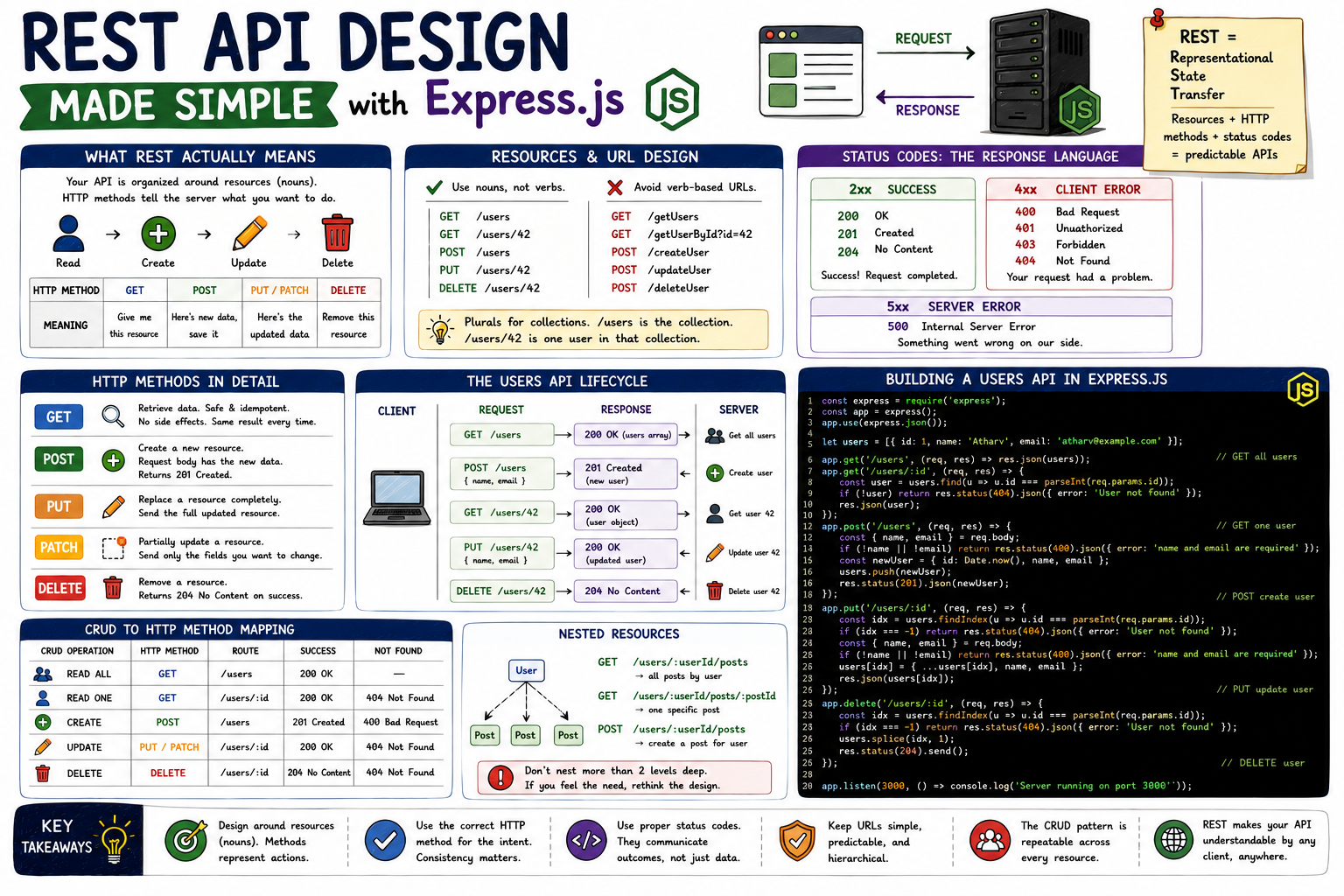
Every application that talks to a server is using an API. The browser fetches a webpage. A mobile app loads a user's feed. A dashboard pulls analytics. In all these cases, the client sends a request and the server sends back data. REST is a set of conventions that make this communication consistent, so any client can talk to any server without needing custom knowledge of how that server was built.
What REST Actually Means
REST stands for Representational State Transfer. Ignore the acronym. What it really means in practice: your API is organized around resources, and you interact with those resources using standard HTTP methods.
A resource is a noun: a user, a post, a product, an order. The API exposes endpoints that represent these things, and HTTP methods represent what you want to do with them. The method tells the server your intent. The URL tells the server what you're talking about.
What you're doing    HTTP Method    What you're saying
─────────────────────────────────────────────────────
Read data            GET            "Give me this resource"
Create data          POST           "Here's a new resource, save it"
Update data          PUT/PATCH      "Here's the updated version"
Delete data          DELETE         "Remove this resource"
This is the entire foundation. Every URL pattern and every convention in REST flows from this.
Resources and URL Design
The first rule: URLs should be nouns, not verbs.
Wrong (verb-based):                Right (resource-based):
GET /getUsers                      GET /users
POST /createUser                   POST /users
GET /getUserById?id=42             GET /users/42
POST /deleteUser                   DELETE /users/42
POST /updateUser                   PUT /users/42
The URL identifies the resource. The HTTP method describes the action. Mixing them means your API becomes a custom language every consumer has to learn instead of a standard one they already know.
Use plurals for collections. /users refers to the collection. /users/42 refers to one user in that collection.
HTTP Methods in Detail
GET: Retrieve data. Safe and idempotent, meaning calling it multiple times has no side effects and gives the same result. Never use GET to modify data.
POST: Create a new resource. The request body contains the data for the new resource. Returns the created resource and a 201 Created status.
PUT: Replace a resource completely. The request body should contain the full updated resource. Returns the updated resource.
PATCH: Partially update a resource. Only send the fields you want to change. Useful when updating one field without overwriting others.
DELETE: Remove a resource. Returns 204 No Content on success (resource is gone, nothing to return).
Status Codes: The Server's Response Language
Status codes tell the client what happened. There are five ranges:
┌─────────────────────────────────────────────────────┐
│                   Status Code Ranges                │
├──────────┬──────────────────────────────────────────┤
│  2xx     │  Success                                 │
│  200 OK  │  Request succeeded, data in body         │
│  201 Created │  New resource created                │
│  204 No Content │  Success, no body to return       │
├──────────┼──────────────────────────────────────────┤
│  4xx     │  Client error (wrong request)            │
│  400 Bad Request │  Invalid data sent               │
│  401 Unauthorized │  Not logged in                  │
│  403 Forbidden │  Logged in but no permission       │
│  404 Not Found │  Resource doesn't exist            │
├──────────┼──────────────────────────────────────────┤
│  5xx     │  Server error (something broke)          │
│  500 Internal Server Error │  Generic server fault  │
└──────────┴──────────────────────────────────────────┘
The most common mistake: returning 200 OK for everything, including errors. The status code is information. Clients and tooling rely on it for error handling, logging, and retry logic. Use the right code.
Building a Users API in Express
Here's the full lifecycle:
Client                                 Express Server
  │                                          │
  │  GET /users                              │
  │─────────────────────────────────────────►│ fetch all users
  │  200 OK + users array                    │
  │◄─────────────────────────────────────────│
  │                                          │
  │  POST /users { name, email }             │
  │─────────────────────────────────────────►│ validate + save
  │  201 Created + new user object           │
  │◄─────────────────────────────────────────│
  │                                          │
  │  GET /users/42                           │
  │─────────────────────────────────────────►│ find user 42
  │  200 OK + user object                    │
  │◄─────────────────────────────────────────│
  │                                          │
  │  PUT /users/42 { name, email }           │
  │─────────────────────────────────────────►│ replace user 42
  │  200 OK + updated user                   │
  │◄─────────────────────────────────────────│
  │                                          │
  │  DELETE /users/42                        │
  │─────────────────────────────────────────►│ delete user 42
  │  204 No Content                          │
  │◄─────────────────────────────────────────│
Now in Express:
const express = require("express");
const app = express();
app.use(express.json());

// In-memory store for demonstration
let users = [{ id: 1, name: "Atharv", email: "atharv@example.com" }];

// GET all users
app.get("/users", (req, res) => {
  res.json(users);
});

// GET one user
app.get("/users/:id", (req, res) => {
  const user = users.find((u) => u.id === parseInt(req.params.id));
  if (!user) return res.status(404).json({ error: "User not found" });
  res.json(user);
});

// POST create user
app.post("/users", (req, res) => {
  const { name, email } = req.body;
  if (!name || !email) {
    return res.status(400).json({ error: "name and email are required" });
  }
  const newUser = { id: Date.now(), name, email };
  users.push(newUser);
  res.status(201).json(newUser);
});

// PUT update user
app.put("/users/:id", (req, res) => {
  const index = users.findIndex((u) => u.id === parseInt(req.params.id));
  if (index === -1) return res.status(404).json({ error: "User not found" });

  const { name, email } = req.body;
  if (!name || !email) {
    return res.status(400).json({ error: "name and email are required" });
  }

  users[index] = { ...users[index], name, email };
  res.json(users[index]);
});

// DELETE user
app.delete("/users/:id", (req, res) => {
  const index = users.findIndex((u) => u.id === parseInt(req.params.id));
  if (index === -1) return res.status(404).json({ error: "User not found" });

  users.splice(index, 1);
  res.status(204).send();
});

app.listen(3000);
CRUD to HTTP Method Mapping
┌────────────┬───────────┬─────────────────┬──────────────┐
│  Operation │  Method   │  Route          │  Status      │
├────────────┼───────────┼─────────────────┼──────────────┤
│  Read all  │  GET      │  /users         │  200         │
│  Read one  │  GET      │  /users/:id     │  200 / 404   │
│  Create    │  POST     │  /users         │  201 / 400   │
│  Update    │  PUT      │  /users/:id     │  200 / 404   │
│  Delete    │  DELETE   │  /users/:id     │  204 / 404   │
└────────────┴───────────┴─────────────────┴──────────────┘
This pattern is repeatable across every resource. Swap users for posts, products, or orders and the exact same structure applies.
Nested Resources
When one resource belongs to another, nest the route:
GET  /users/:userId/posts          → all posts by user
GET  /users/:userId/posts/:postId  → one specific post
POST /users/:userId/posts          → create a post for user
Don't nest more than two levels deep. It gets hard to read and usually means you can restructure instead.
Key Takeaways
- REST organizes APIs around resources (nouns), not actions (verbs). The HTTP method carries the action.
- URLs should be plural nouns:
/users,/posts,/products. Dynamic segments use:id. - GET reads, POST creates, PUT replaces, DELETE removes. Use the right method for the intent.
- Status codes communicate outcome.
201for created,204for deleted,400for bad input,404for not found. Never return200for errors. - The same CRUD pattern applies to every resource. Learn it once, apply it everywhere.
REST conventions exist because predictability has real value. A developer who has used one REST API can figure out any other REST API with minimal documentation. That's the actual point: not the acronym, not the architecture paper, just a shared language between clients and servers.