Synchronous vs Asynchronous JavaScript: Understanding How JavaScript Handles Tasks
Learn the fundamental difference between synchronous and asynchronous JavaScript with real-world examples, visual diagrams, and practical code samples.
Learn the fundamental difference between synchronous and asynchronous JavaScript, why async behavior is essential for modern web development, and how JavaScript manages multiple tasks without blocking your application.
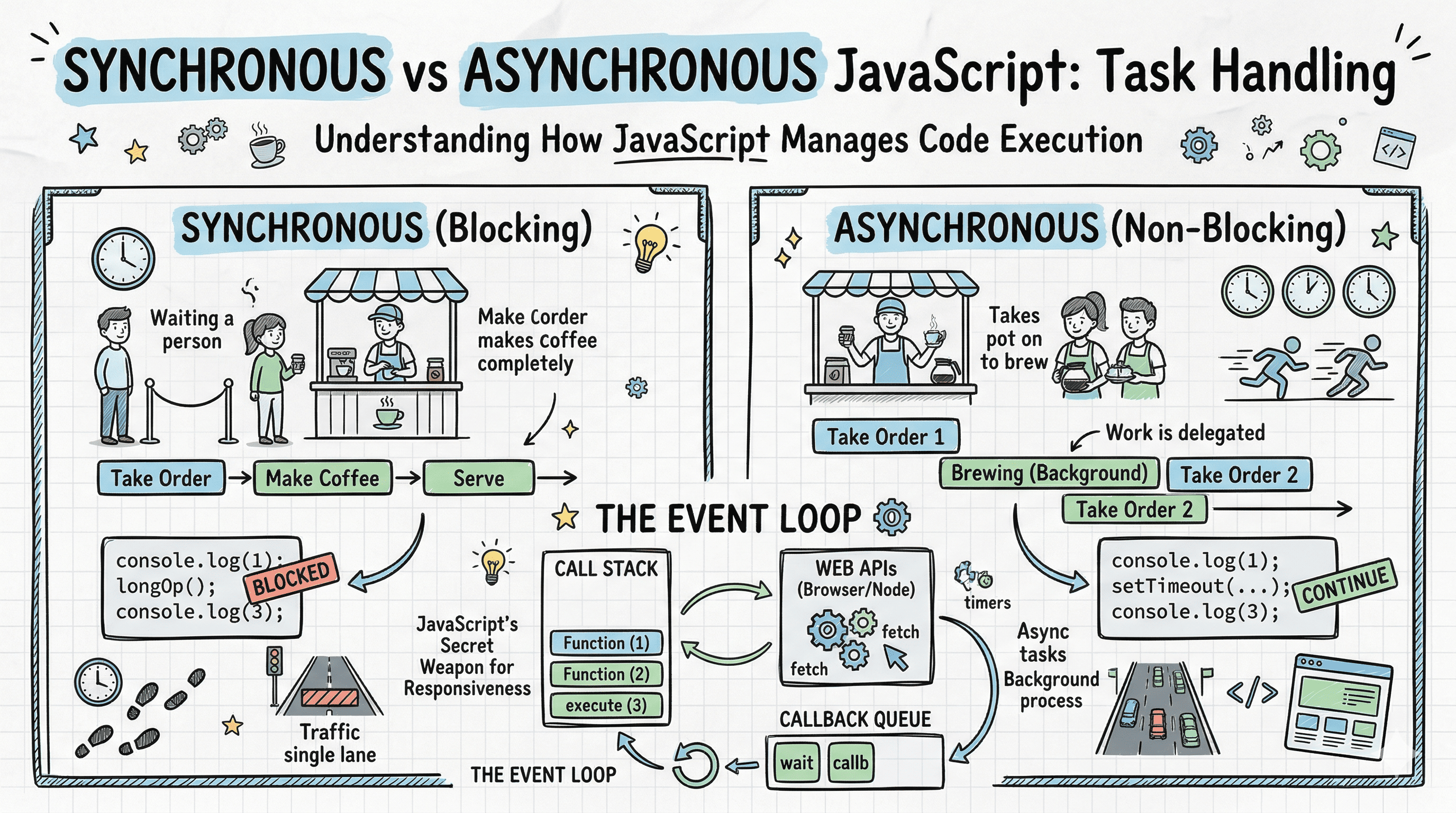
Imagine you're at a coffee shop. In one coffee shop, the barista takes your order, makes your coffee from start to finish, and only then moves to the next customer. In another coffee shop, the barista takes your order, starts your coffee, and while it brews, takes the next customer's order. The first shop operates synchronously (one thing at a time), while the second operates asynchronously (managing multiple tasks efficiently). This is exactly how JavaScript can execute code.
Understanding the difference between synchronous and asynchronous execution is fundamental to writing efficient JavaScript applications. Whether you're fetching data from an API, reading files, or handling user interactions, knowing when and how your code runs can make the difference between a smooth user experience and a frozen, unresponsive application.
What Is Synchronous Code?
Synchronous code is the default way JavaScript executes: one line at a time, in order, waiting for each operation to complete before moving to the next. Think of it like reading a book you read page 1, then page 2, then page 3, in sequence. You can't read page 3 until you've finished page 2.
Here's a simple example:
console.log("First");
console.log("Second");
console.log("Third");
The output is predictable and sequential:
First
Second
Third
Each console.log() executes completely before the next one starts. This is synchronous execution in its purest form.
Let's visualize synchronous execution with a timeline:
Time ──────────────────────────────────────────────────>

Task 1: console.log("First")
█████░░░░░░░░░░░░░░░░░░░░░░░░░░░░░░░░░░░░░░░░

Task 2: console.log("Second")
     █████░░░░░░░░░░░░░░░░░░░░░░░░░░░░░░░░░░░

Task 3: console.log("Third")
          █████░░░░░░░░░░░░░░░░░░░░░░░░░░░░░░

█ = Executing
░ = Waiting/Not Started

Each task waits for the previous one to finish.
The Blocking Problem
Synchronous code becomes problematic when operations take time. Consider this example:
function processHugeFile() {
  // Imagine this takes 5 seconds
  let result = "";
  for (let i = 0; i < 5000000000; i++) {
    result += i;
  }
  return result;
}

console.log("Starting file processing...");
const data = processHugeFile(); // This blocks everything
console.log("File processed!");
console.log("Now we can continue...");
During those 5 seconds, nothing else can happen. The browser freezes. Users can't click buttons, scroll, or interact with the page. This is called blocking code because it blocks all other operations from running.
Think of it like a single-lane road with a broken-down truck. Every car behind it must wait. No one can pass, no one can move forward, and traffic comes to a complete halt. That's exactly what happens when synchronous operations block JavaScript's single execution thread.
For intermediate developers: JavaScript has a single call stack, meaning only one function can execute at a time. When a function is running, it must complete before another can start. This synchronous, single-threaded nature is both a simplicity and a limitation.
What Is Asynchronous Code?
Asynchronous code allows JavaScript to start a task and move on to other work while waiting for that task to complete. Instead of blocking, JavaScript delegates time-consuming operations and continues executing other code. When the operation finishes, JavaScript comes back to handle the result.
Here's the coffee shop analogy again: The barista (JavaScript) takes your order (starts a task), puts your coffee in the machine (delegates the work), and helps other customers (continues executing other code) while your coffee brews (task completes in the background). When your coffee is ready (task finishes), the barista calls your name (callback/promise resolves) and you get your result.
Let's see asynchronous code in action:
console.log("First");

setTimeout(() => {
  console.log("Second (delayed)");
}, 2000);

console.log("Third");
You might expect:
First
Second (delayed)
Third
But you actually get:
First
Third
Second (delayed)
What happened? JavaScript didn't wait for setTimeout to finish. Instead, it:
- Executed
console.log("First") - Started the timer for
setTimeoutand immediately moved on - Executed
console.log("Third") - After 2 seconds, executed the callback with
console.log("Second (delayed)")
Here's the asynchronous execution timeline:
Time ──────────────────────────────────────────────────>
                                         (2 seconds later)

Main Thread:
console.log("First")
████░░░░░░░░░░░░░░░░░░░░░░░░░░░░░░░░░░░░░░░░░░

setTimeout() [registered]
    █░░░░░░░░░░░░░░░░░░░░░░░░░░░░░░░░░░░░░░░░░

console.log("Third")
     ████░░░░░░░░░░░░░░░░░░░░░░░░░░░░░░░░░░░░░

Timer (background):
2-second wait
     ░░░░░░░░░░░░░░░░░░░░░░░░████
                              ↓
                    Callback executes:
                    console.log("Second (delayed)")
                              ████

Main thread doesn't wait it keeps executing!
Why JavaScript Needs Asynchronous Behavior
JavaScript runs in a single-threaded environment, especially in browsers. This means there's only one call stack handling code execution. If everything ran synchronously, every time you:
- Fetched data from a server (could take seconds)
- Loaded an image
- Read a file
- Waited for user input
...the entire application would freeze. No scrolling, no clicking, no animations nothing. The user experience would be terrible.
Asynchronous programming solves this by allowing JavaScript to:
- Delegate time-consuming tasks to browser APIs or Node.js APIs
- Continue executing other code while waiting
- Handle the result when the task completes
Real-World Example: API Calls
Imagine you're building a weather app. When a user searches for a city, you need to fetch weather data from an API. This network request might take 500ms, 2 seconds, or even fail completely due to network issues.
Synchronous (blocking) approach This would freeze your app:
function getWeatherSync(city) {
  // Imagine this blocks for 2 seconds
  const weather = fetchWeatherFromAPISync(city); // BLOCKS!
  return weather;
}

console.log("Fetching weather...");
const data = getWeatherSync("London"); // User can't do anything for 2 seconds
console.log("Weather data:", data);
console.log("Done!");
Asynchronous (non-blocking) approach This keeps your app responsive:
function getWeatherAsync(city) {
  fetchWeatherFromAPI(city)
    .then((weather) => {
      console.log("Weather data:", weather);
    })
    .catch((error) => {
      console.log("Error:", error);
    });
}

console.log("Fetching weather...");
getWeatherAsync("London"); // Returns immediately!
console.log("You can keep using the app!"); // Runs right away
The asynchronous version allows users to continue interacting with your app while data loads in the background. Buttons still work, animations still play, and the interface stays responsive.
How JavaScript Manages Asynchronous Tasks: The Event Loop
Here's where things get interesting for intermediate and advanced devs. JavaScript achieves asynchronous behavior using the Event Loop, which coordinates between the call stack, Web APIs, and callback queue.
Let's visualize the complete architecture:
┌─────────────────────────────────────────────────────┐
│              JavaScript Runtime                     │
│                                                     │
│  ┌──────────────────┐        ┌─────────────────┐    │
│  │   Call Stack     │        │   Web APIs      │    │
│  │                  │        │                 │    │
│  │  function3()     │        │  setTimeout()   │    │
│  │  function2()     │        │  fetch()        │    │
│  │  function1()     │        │  DOM events     │    │
│  └────────┬─────────┘        └────────┬────────┘    │
│           │                           │             │
│           │ executes                  │ delegates   │
│           │ one at a time             │ async work  │
│           │                           │             │
│           ▼                           ▼             │
│  ┌──────────────────┐        ┌─────────────────┐    │
│  │   Heap (Memory)  │◄───────│ Callback Queue  │    │
│  └──────────────────┘        │                 │    │
│                              │  callback1()    │    │
│                              │  callback2()    │    │
│                              └────────┬────────┘    │
│                                       │             │
│                    ┌──────────────────┘             │
│                    │                                │
│                    ▼                                │
│           ┌─────────────────┐                       │
│           │   Event Loop    │                       │
│           │  (orchestrator) │                       │
│           └─────────────────┘                       │
│                                                     │
│  Event Loop constantly checks:                      │
│  1. Is call stack empty?                            │
│  2. Are there callbacks in queue?                   │
│  3. If yes to both → move callback to call stack    │
└─────────────────────────────────────────────────────┘
Here's what happens step by step:
- Synchronous code executes on the call stack
- Asynchronous operations (timers, API calls, events) are delegated to Web APIs
- When async operations complete, their callbacks go to the callback queue
- The Event Loop monitors the call stack
- When the call stack is empty, the Event Loop moves callbacks from the queue to the stack
- Callbacks execute, process completes
This architecture allows JavaScript to handle thousands of concurrent operations without multiple threads. It's elegant, efficient, and the foundation of modern web development.
Common Asynchronous Patterns
JavaScript provides several ways to write asynchronous code. Let's look at the evolution:
Callbacks (The Original Way)
fetchUserData(userId, function (error, user) {
  if (error) {
    console.log("Error:", error);
    return;
  }

  fetchUserPosts(user.id, function (error, posts) {
    if (error) {
      console.log("Error:", error);
      return;
    }

    console.log("Posts:", posts);
  });
});
Pros: Simple concept, widely supported
Cons: "Callback hell" with nested callbacks, error handling is tedious
Promises (Modern Approach)
fetchUserData(userId)
  .then((user) => fetchUserPosts(user.id))
  .then((posts) => console.log("Posts:", posts))
  .catch((error) => console.log("Error:", error));
Pros: Chainable, cleaner error handling, avoids deep nesting
Cons: Still requires understanding promise chains
Async/Await (Most Readable)
async function getUserPosts(userId) {
  try {
    const user = await fetchUserData(userId);
    const posts = await fetchUserPosts(user.id);
    console.log("Posts:", posts);
  } catch (error) {
    console.log("Error:", error);
  }
}
Pros: Looks like synchronous code, easy to read and understand
Cons: Must remember to use try/catch for error handling
All three patterns achieve the same result: non-blocking asynchronous execution. The syntax just becomes progressively more readable and maintainable.
Blocking vs Non-Blocking: Side by Side
Let's compare the same operation implemented both ways:
┌──────────────────────┬──────────────────────┐
│   BLOCKING (Sync)    │  NON-BLOCKING (Async)│
├──────────────────────┼──────────────────────┤
│                      │                      │
│  Start fetching      │  Start fetching      │
│       ↓              │       ↓              │
│  █████████████       │  █ (delegated to     │
│  (waiting... 2s)     │     Web API)         │
│       ↓              │       ↓              │
│  Process response    │  Continue other work │
│       ↓              │       █              │
│  Continue program    │       ↓              │
│       █              │  (2s later...)       │
│                      │  Process response    │
│                      │       █              │
│                      │       ↓              │
│ Total time wasted:   │  Continue program    │
│ 2 seconds frozen     │       █              │
│                      │                      │
│ User Experience:     │  Total time wasted:  │
│ "App is frozen!"     │  0 seconds           │
│                      │                      │
│ Other tasks:         │  User Experience:    │
│ All blocked          │  "App is responsive!"│
│                      │                      │
│                      │  Other tasks:        │
│                      │  All running normally│
└──────────────────────┴──────────────────────┘
The non-blocking approach doesn't make the operation faster, but it keeps your application responsive while waiting.
Key Takeaways
Synchronous code executes sequentially, one task at a time, waiting for each to complete. It's simple and predictable but can freeze your application when operations take time.
Asynchronous code allows JavaScript to start tasks, continue executing other code, and handle results when ready. It's essential for responsive web applications but requires understanding callbacks, promises, or async/await syntax.
JavaScript needs async behavior because it's single-threaded. Without asynchronous programming, every network request, file read, or timer would block the entire application, creating a terrible user experience.
The Event Loop is JavaScript's secret weapon: it coordinates between the call stack, Web APIs, and callback queue to create the illusion of concurrent execution without multiple threads.
Use asynchronous patterns for any operation that takes time: API calls, file I/O, database queries, timers, or event handlers. This keeps your applications fast, responsive, and user-friendly.
When you write JavaScript, remember the coffee shop: don't make your users wait in a single-file line when you can serve them efficiently by handling multiple orders at once. That's the power of asynchronous JavaScript.