Error Handling in JavaScript: Try, Catch, Finally
Learn how JavaScript error handling works from the ground up.
Every JavaScript program will eventually break. The question is whether it breaks loudly and destroys the user experience, or whether it fails gracefully and keeps everything under control. This post is about the tools that let you choose.
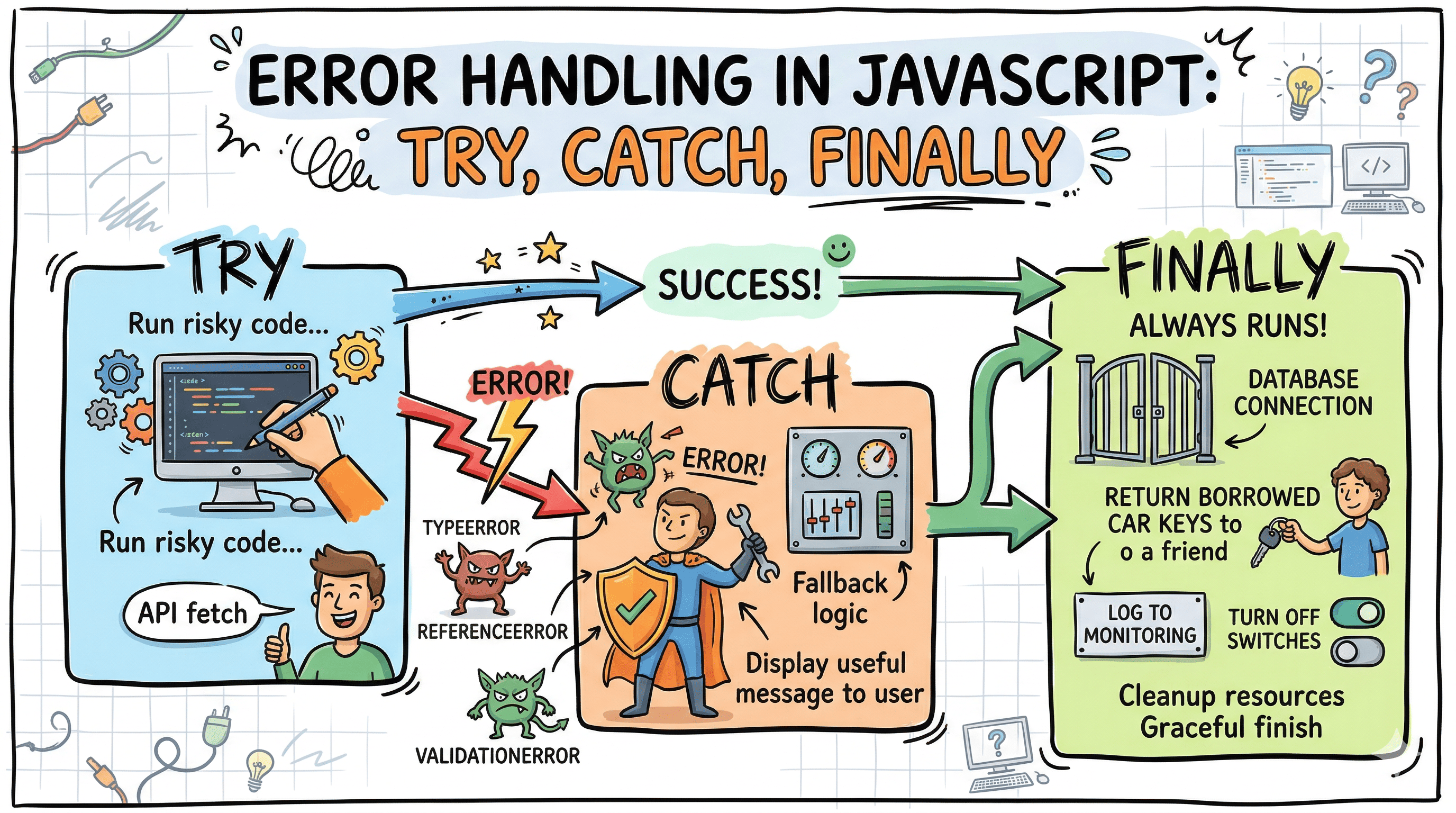
You write some code. It works. You ship it. Then someone on a flaky network, or with an unusual input, or at 2am when the database is tired, hits your app and everything falls apart. Not because your logic was wrong. Just because reality is unpredictable.
That gap between "works on my machine" and "works in production" is where error handling lives. And in JavaScript, the primary tool for managing that gap is the try...catch...finally block.
What Even Is an Error in JavaScript?
Before we talk about catching errors, it helps to understand what they actually are.
At its core, an error in JavaScript is an object. When something goes wrong at runtime, the JavaScript engine creates an instance of the Error class (or one of its subtypes) and throws it. That object has two important properties you'll always see: name and message.
const err = new Error("Something went wrong");
console.log(err.name); // "Error"
console.log(err.message); // "Something went wrong"
console.log(err.stack); // Full stack trace string
JavaScript ships with several built-in error types, each representing a different class of problem:
| Error Type | When It Happens |
|---|---|
SyntaxError | Your code itself is malformed (caught at parse time) |
ReferenceError | You're referencing a variable that doesn't exist |
TypeError | You're using a value in a way its type doesn't support |
RangeError | A value is outside the allowed range (like array length) |
URIError | Malformed URI passed to decodeURIComponent and friends |
EvalError | Something went wrong with eval() (rare) |
Real examples:
// ReferenceError: undeclaredVariable is not defined
console.log(undeclaredVariable);

// TypeError: Cannot read properties of null (reading 'name')
const user = null;
console.log(user.name);

// RangeError: Invalid array length
const arr = new Array(-1);
These are runtime errors, the ones that only appear when the code actually executes. A SyntaxError is different because the engine catches it before your code even runs. You can't wrap a SyntaxError in a try...catch, it'll never get that far.
JavaScript Code
      │
      ▼
┌─────────────────┐
│  Parse Phase    │──── SyntaxError caught HERE (before execution)
└────────┬────────┘
         │
         ▼
┌─────────────────┐
│ Execution Phase │──── Runtime errors (TypeError, ReferenceError, etc.)
└─────────────────┘
The try and catch Blocks
Think of a try block like a safety net under a tightrope walker. The performer goes about their act normally, but if they slip, the net catches them instead of letting them hit the floor.
try {
  // The risky operation
  const data = JSON.parse(userInput);
  console.log(data.name);
} catch (error) {
  // The fallback if something goes wrong
  console.error("Failed to parse input:", error.message);
}
Here's what's happening step by step:
- JavaScript enters the
tryblock and starts executing. - If everything runs fine, the
catchblock is completely skipped. - If an error is thrown at any point inside
try, execution stops immediately and jumps tocatch. - The
catchblock receives the error object as its parameter.
         try block
        ┌──────────────────────────┐
        │  line 1 runs...          │
        │  line 2 runs...          │──── Error thrown!
        │  line 3 SKIPPED          │
        └──────────────────────────┘
                    │
                    ▼
         catch block
        ┌──────────────────────────┐
        │  Receives error object   │
        │  You handle it here      │
        └──────────────────────────┘
If there is no error:
         try block
        ┌──────────────────────────┐
        │  line 1 runs...          │
        │  line 2 runs...          │
        │  line 3 runs...          │
        └──────────────────────────┘
                    │
                    ▼
         catch block
        ┌──────────────────────────┐
        │  SKIPPED entirely        │
        └──────────────────────────┘
Inspecting the Error Object in catch
The parameter name in catch is just a convention. Most people use error or err, but you can name it anything. What matters is what's inside.
try {
  null.toString(); // TypeError
} catch (error) {
  console.log(error.name); // "TypeError"
  console.log(error.message); // "Cannot read properties of null (reading 'toString')"
  console.log(error.stack); // Full stack trace with file names and line numbers
}
The stack property is your best friend when debugging. It tells you exactly where the error originated and how the call stack looked at that moment.
What try...catch Cannot Catch
This is something that trips up a lot of people. try...catch only works on synchronous code, or async code that you've awaited properly.
// This will NOT work as expected
try {
  setTimeout(() => {
    throw new Error("This will crash the app");
  }, 1000);
} catch (error) {
  console.log("Never reaches here");
}
Why? Because by the time the setTimeout callback runs, the try...catch block has already finished executing. The error is thrown outside its scope.
The correct way to handle errors in async code:
// Using async/await (clean and readable)
async function fetchUser(id) {
  try {
    const response = await fetch(`/api/users/${id}`);
    if (!response.ok) {
      throw new Error(`HTTP error: ${response.status}`);
    }
    const data = await response.json();
    return data;
  } catch (error) {
    console.error("Fetch failed:", error.message);
    return null;
  }
}

// Using .catch() on a Promise
fetch("/api/users/1")
  .then((res) => res.json())
  .catch((err) => console.error("Failed:", err.message));
The finally Block
Here's where things get interesting. finally is the block that runs no matter what. Error or no error, finally executes.
The real-life version: imagine you borrow your friend's car. Whatever happens during the trip, whether it's a great drive or you get a flat tire, you're returning the keys when you're done. That's finally. It's cleanup code that must always run.
function readConfig() {
  let connection = null;

  try {
    connection = openDatabaseConnection();
    const config = connection.query("SELECT * FROM config");
    return config;
  } catch (error) {
    console.error("Failed to read config:", error.message);
    return null;
  } finally {
    // This always runs, even if try returned early
    if (connection) {
      connection.close();
    }
  }
}
┌─────────────────────────────────────────────────────┐
│ try block │
│ ┌─────────────────┐ ┌──────────────────────┐ │
│ │ No error path │ │ Error thrown path │ │
│ └────────┬────────┘ └──────────┬───────────┘ │
└───────────┼───────────────────────────┼─────────────┘
│ │
│ catch block │
│ ┌──────────────────┤
│ │ Handles error │
│ └────────┬─────────┘
│ │
▼ ▼
┌─────────────────────────────────────────────────────┐
│ finally block │
│ ALWAYS runs (no exceptions) │
└─────────────────────────────────────────────────────┘The Tricky Part About finally and return
This is an advanced quirk worth knowing. If you have a return in both try and finally, the finally return wins.
function tricky() {
  try {
    return "from try";
  } finally {
    return "from finally"; // This one wins
  }
}

console.log(tricky()); // "from finally"
The try block's return value gets discarded. This is almost never what you want, so avoid using return inside finally unless you have a very specific reason.
Throwing Custom Errors
The throw keyword lets you manually trigger an error. You can throw anything: a string, a number, an object. But throwing an actual Error instance is the right approach because it gives you the stack trace.
function divide(a, b) {
  if (b === 0) {
    throw new Error("Division by zero is not allowed");
  }
  return a / b;
}

try {
  const result = divide(10, 0);
} catch (error) {
  console.error(error.message); // "Division by zero is not allowed"
}
Creating Custom Error Classes
For any serious application, you'll want error types that carry semantic meaning. Instead of catching a generic Error and guessing what went wrong, you can define your own error classes.
class ValidationError extends Error {
  constructor(message, field) {
    super(message);
    this.name = "ValidationError";
    this.field = field;
  }
}

class NetworkError extends Error {
  constructor(message, statusCode) {
    super(message);
    this.name = "NetworkError";
    this.statusCode = statusCode;
  }
}
Now you can use instanceof in your catch block to handle different error types differently:
async function submitForm(data) {
  try {
    validateForm(data); // Might throw ValidationError
    await sendToAPI(data); // Might throw NetworkError
  } catch (error) {
    if (error instanceof ValidationError) {
      showFieldError(error.field, error.message);
    } else if (error instanceof NetworkError) {
      showToast(`Server error ${error.statusCode}: please try again`);
    } else {
      // Unknown error, log and show generic message
      console.error("Unexpected error:", error);
      showToast("Something went wrong. Please refresh and try again.");
    }
  }
}
This pattern, called discriminated error handling, is what separates maintainable error handling from spaghetti catch blocks that log error and hope for the best.
          Error thrown in try block
                    │
                    ▼
           catch (error) block
                    │
          ┌─────────┴─────────┐
          │  instanceof check │
          └─────────┬─────────┘
                    │
       ┌────────────┼────────────┐
       ▼            ▼            ▼
ValidationError  NetworkError  Unknown
Handle field    Show status   Log + generic
error           code message  user message
Why Error Handling Actually Matters
Here's the thing: beginners often treat error handling as an afterthought. You write the happy path, it works, you ship. But error handling is not optional polish. It is part of the feature.
Graceful Failure vs Crashing
An unhandled error in a browser will silently break parts of your UI. An unhandled error in a Node.js server will crash the process entirely. Neither is acceptable in production.
Graceful failure means your application remains usable even when a specific operation fails. The user gets a clear, human-readable message instead of a white screen or a cryptic console dump.
// Without error handling (bad)
async function loadUserProfile() {
  const user = await fetchUser(); // If this throws, the whole component breaks
  renderProfile(user);
}

// With error handling (good)
async function loadUserProfile() {
  try {
    const user = await fetchUser();
    renderProfile(user);
  } catch (error) {
    showErrorState("Could not load your profile. Please refresh.");
    logToMonitoring(error); // Send to Sentry, Datadog, etc.
  }
}
Debugging Benefits
A properly structured error with a stack trace is worth ten console.log statements. When you catch an error and log it properly, or send it to a monitoring service, you get:
- The exact file and line number where the error occurred
- The call stack showing what sequence of functions led there
- The error type, telling you the class of problem
- The message you wrote (or the engine wrote), telling you the specifics
Compare debugging a blank screen versus debugging a NetworkError: 401 Unauthorized on /api/users/me at fetchCurrentUser (auth.js:42). One is a mystery. The other has a solution.
Input You Did Not Expect
Your code will receive data you never planned for. Users paste the wrong thing, APIs return unexpected shapes, external services go down mid-request. Error handling is how you defend against inputs and conditions that your happy path was never designed for.
function parseUserAge(input) {
  const age = parseInt(input, 10);

  if (isNaN(age)) {
    throw new ValidationError("Age must be a number", "age");
  }
  if (age < 0 || age > 130) {
    throw new ValidationError("Age must be between 0 and 130", "age");
  }

  return age;
}
Putting It All Together
Here is a realistic example showing all the pieces working together in a typical async function:
class AppError extends Error {
  constructor(message, type = "GENERIC") {
    super(message);
    this.name = "AppError";
    this.type = type;
  }
}

async function getUserData(userId) {
  let loadingIndicator = null;

  try {
    // Show loading state
    loadingIndicator = showSpinner();

    if (!userId) {
      throw new AppError("User ID is required", "VALIDATION");
    }

    const response = await fetch(`/api/users/${userId}`);

    if (!response.ok) {
      throw new AppError(`Failed to fetch user: ${response.status}`, "NETWORK");
    }

    const user = await response.json();
    renderUser(user);
    return user;
  } catch (error) {
    if (error instanceof AppError) {
      if (error.type === "VALIDATION") {
        showInlineError(error.message);
      } else if (error.type === "NETWORK") {
        showRetryPrompt(error.message);
      }
    } else {
      // Unexpected error, let it bubble up after logging
      console.error("[getUserData] Unexpected error:", error);
      throw error;
    }
  } finally {
    // Always remove the spinner, regardless of success or failure
    if (loadingIndicator) {
      hideSpinner(loadingIndicator);
    }
  }
}
Notice a few things here. The finally block handles cleanup that must happen no matter what. The catch block handles known errors with specific UI responses. Unknown errors are logged and re-thrown, because silently swallowing errors you do not understand is worse than letting them surface.
Key Takeaways
Error handling is not about making your code bulletproof. It is about making failures predictable and recoverable.
A few things to walk away with: try...catch only catches synchronous errors and awaited async errors. For Promises you are not awaiting, use .catch(). The finally block is for cleanup that must always run regardless of outcome. Custom error classes with instanceof checks give you precise, readable control over different failure modes. Re-throwing errors you do not understand is better than swallowing them silently. And the stack trace on an Error object is your most useful debugging tool, use it.
Good error handling does not make your app perfect. It makes your app honest about when things go wrong, and kind to the user when they do.