Destructuring in JavaScript
Learn how JavaScript destructuring works for arrays and objects. Includes clear before/after comparisons.
Destructuring is a concise syntax for pulling values out of arrays and objects into individual variables. This post covers array destructuring, object destructuring, default values, and the real-world patterns where this shines.
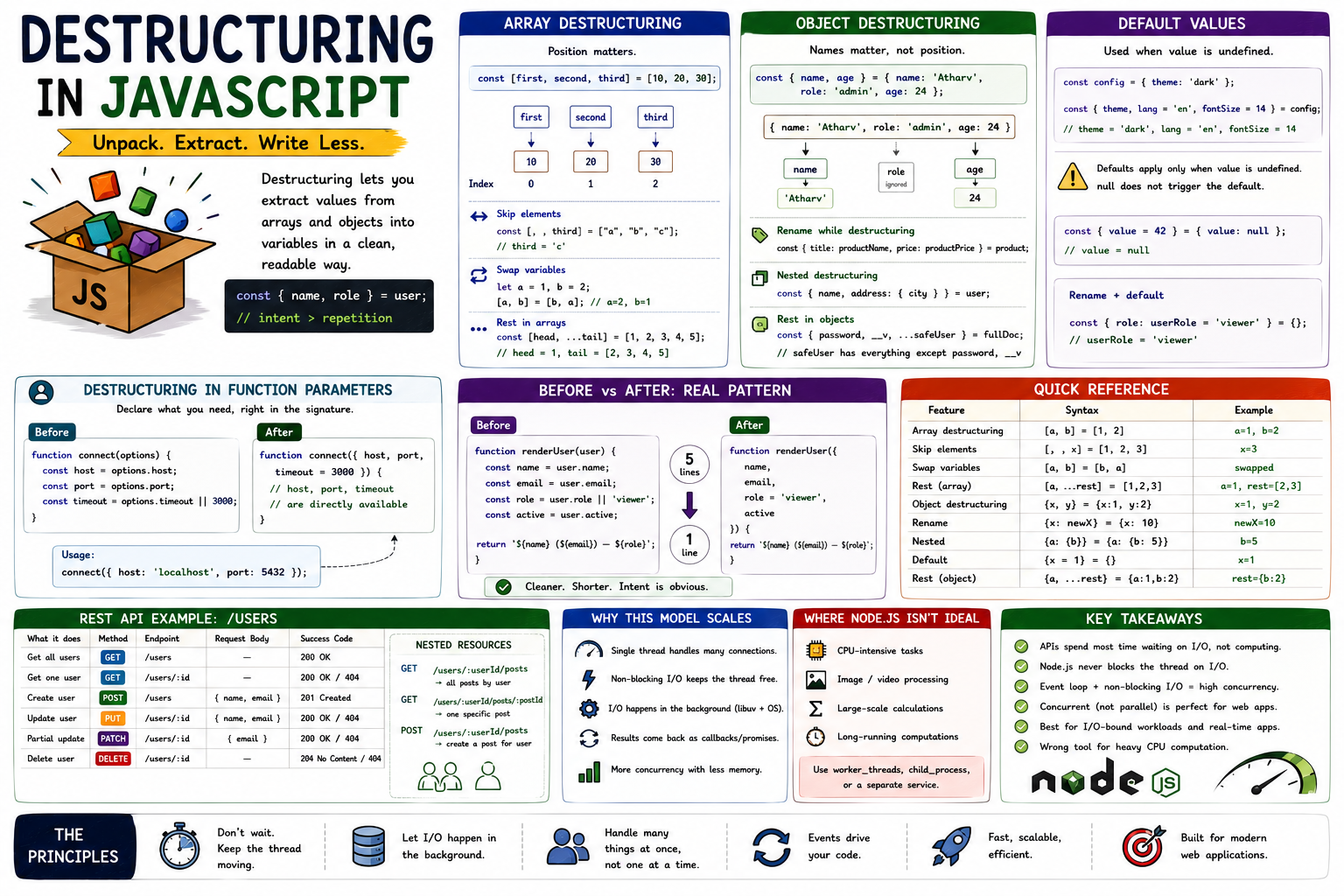
Before destructuring, extracting values from objects or arrays meant repetitive assignment statements. One variable per line, one property access per line. Destructuring collapses all of that into a single, readable declaration. Same result, a fraction of the code.
What Destructuring Does
Destructuring doesn't change your data. It just gives you a cleaner way to unpack it. You describe the shape of what you want, and JavaScript extracts the values into variables for you.
// Without destructuring
const user = { name: "Atharv", role: "admin", age: 24 };

const name = user.name;
const role = user.role;
const age = user.age;

// With destructuring
const { name, role, age } = user;
Same outcome. The destructuring version reads like a declaration of intent: "from this object, give me these named values."
Destructuring Arrays
With arrays, position matters. The variable on the left maps to the element at that index on the right.
Array destructuring mapping:

const [first, second, third] = [10, 20, 30];
        │       │       │         │   │   │
        └───────┘       └─────────┘   │   │
                │                     │   │
            first=10             second=20 third=30
const colors = ["red", "green", "blue"];
const [primary, secondary, tertiary] = colors;
console.log(primary); // 'red'
console.log(secondary); // 'green'Skipping elements: Use an empty slot (comma with no variable name) to skip positions you don't need.
const [, , third] = ["a", "b", "c"];
console.log(third); // 'c'
Swapping variables: One of the cleanest applications of array destructuring, no temp variable needed:
let a = 1;
let b = 2;

[a, b] = [b, a];

console.log(a); // 2
console.log(b); // 1
Rest in arrays: Collect remaining elements into a new array:
const [head, ...tail] = [1, 2, 3, 4, 5];
// head = 1
// tail = [2, 3, 4, 5]
Destructuring Objects
With objects, names matter, not position. The variable name on the left must match the property name on the right.
Object destructuring extraction:

const { name, age } = { name: 'Atharv', role: 'admin', age: 24 }
         │     │                 │                          │
         └─────┘                 └──────────────────────────┘
         extracted           from source object
         (role is ignored)
const product = {
id: 101,
title: "Keyboard",
price: 1499,
inStock: true,
};
const { title, price } = product;
// id and inStock are untouched, not in scopeRenaming while destructuring: Use a colon to assign a different variable name than the property key:
const { title: productName, price: productPrice } = product;

console.log(productName); // 'Keyboard'
console.log(productPrice); // 1499
// 'title' and 'price' are not defined as variables
Nested destructuring: When objects have nested structure:
const user = {
  name: "Atharv",
  address: {
    city: "Pune",
    country: "India",
  },
};

const {
  name,
  address: { city },
} = user;
// name = 'Atharv', city = 'Pune'
// 'address' itself is not a variable here
Rest in objects: Extract specific keys and bundle the rest:
const { password, __v, ...safeUser } = fullDocument;
// safeUser has everything except password and __v
This pattern is common in API handlers where you want to strip sensitive fields before sending a response.
Default Values
If a property doesn't exist or is undefined, destructuring can fall back to a default:
const config = { theme: "dark" };

const { theme, lang = "en", fontSize = 14 } = config;
// theme = 'dark'
// lang = 'en'     (not in config, falls back)
// fontSize = 14   (not in config, falls back)
Defaults only apply when the value is undefined. A null value does not trigger the default.
const { value = 42 } = { value: null };
console.log(value); // null — null is not undefined
You can combine renaming and defaults:
const { role: userRole = "viewer" } = {};
// userRole = 'viewer'
Destructuring in Function Parameters
This is where the pattern becomes especially useful. Instead of accessing options.timeout, options.retries, etc., you declare exactly what you need right in the function signature:
// Before
function connect(options) {
  const host = options.host;
  const port = options.port;
  const timeout = options.timeout || 3000;
}

// After
function connect({ host, port, timeout = 3000 }) {
  // host, port, timeout are directly available
}

connect({ host: "localhost", port: 5432 });
The function signature documents its expectations. You can see at a glance what the function needs. Default values sit right next to the parameter they belong to.
Before vs After: Real Pattern
Before destructuring:
function renderUser(user) {
  const name = user.name;
  const email = user.email;
  const role = user.role || "viewer";
  const active = user.active;

  return `${name} (${email}) — ${role}`;
}
After:
function renderUser({ name, email, role = "viewer", active }) {
  return `${name} (${email}) — ${role}`;
}
Five lines become one. active is available if needed. Defaults are inline. The intent is clear.
Key Takeaways
- Destructuring doesn't change data. It extracts values from arrays and objects into named variables cleanly.
- Array destructuring is position-based. Object destructuring is name-based.
- Skip array elements with empty slots. Rename object properties with
key: newName. - Defaults apply only when the value is
undefined.nulldoes not trigger a default. - Use rest (
...) in destructuring to collect remaining values: array elements or object properties. - Destructuring in function parameters is one of the highest-value uses: it documents what the function needs and keeps the body clean.
Destructuring is one of those ES6 features that feels minor until you start using it consistently. Then going back to repeated obj.prop assignments starts to feel like writing longhand when you already know shorthand. Once it's part of how you write JavaScript, it just reads better.