What is Node.js? JavaScript on the Server Explained
earn what Node.js is, how it lets JavaScript run on servers, what V8 and libuv do, and why developers adopted it over PHP and Java.
Node.js is a runtime that lets JavaScript run outside the browser, directly on a server or your local machine. This post explains what that means, why it matters, and how Node.js changed what JavaScript could do.
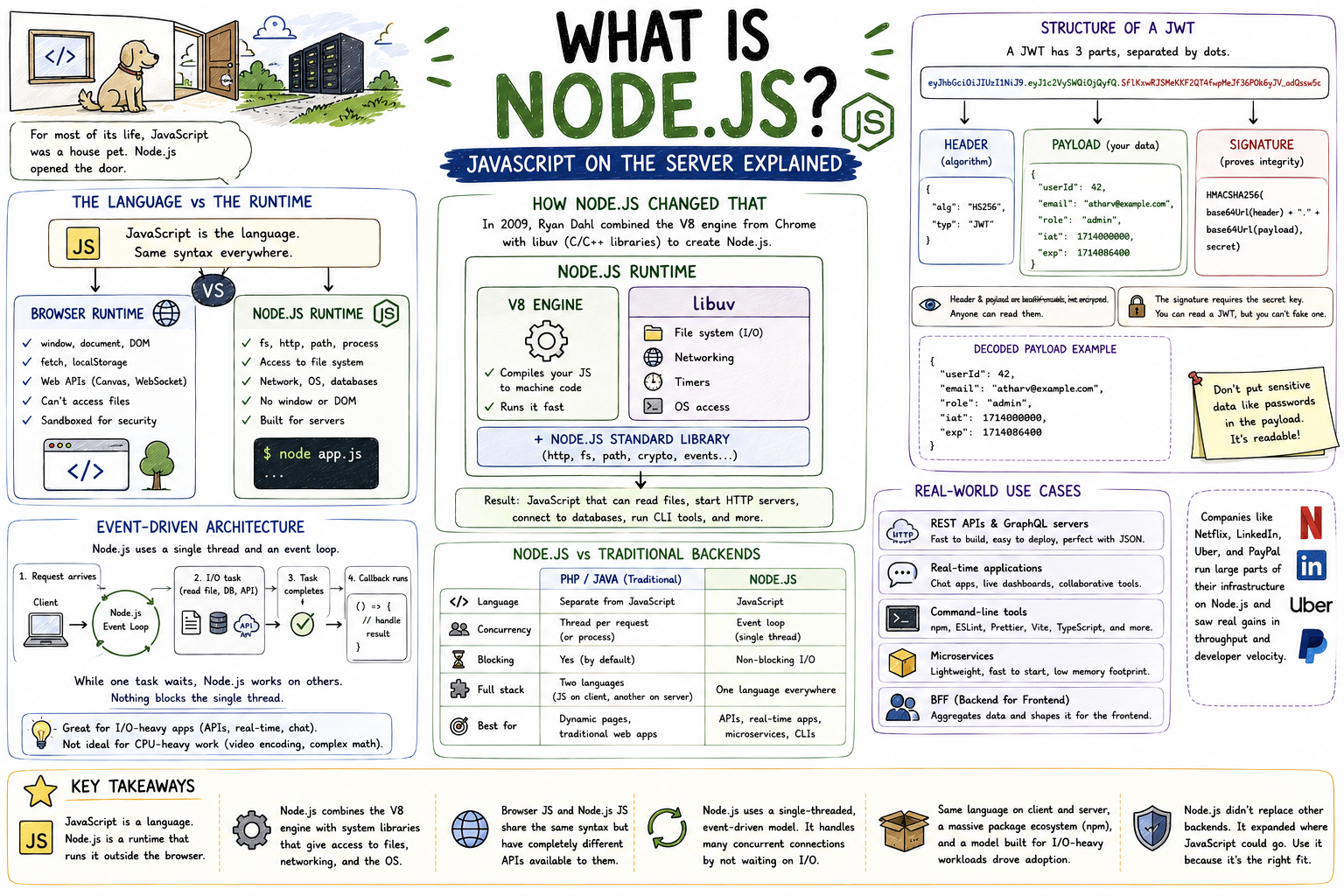
For most of its life, JavaScript was a house pet. It lived inside the browser, did what the browser allowed, and couldn't go outside. It could update a webpage, respond to a button click, make an HTTP request. Useful things, but only within the walls of a browser tab. Node.js opened the door. JavaScript could now run on a server, access the file system, open network connections, and do everything a backend language can do.
The Language vs the Runtime
This distinction matters. JavaScript is a programming language: a set of syntax rules and semantics. A runtime is the environment that actually executes it. The same language can run in different runtimes with different capabilities.
┌─────────────────────────────────────────────────────────┐
│                  JavaScript the Language                │
│                                                         │
│   variables, functions, loops, classes, promises...     │
│              (same syntax everywhere)                   │
└─────────────┬───────────────────────────┬───────────────┘
              │                           │
              ▼                           ▼
┌─────────────────────────┐   ┌───────────────────────────┐
│    Browser Runtime      │   │      Node.js Runtime      │
│                         │   │                           │
│  window, document, DOM  │   │  fs, http, path, process  │
│  fetch, localStorage    │   │  access to file system    │
│  canvas, WebSocket API  │   │  network, OS, databases   │
│                         │   │                           │
│  Can't access files     │   │  No window or DOM         │
└─────────────────────────┘   └───────────────────────────┘
When you write document.getElementById() in the browser, that's the browser's runtime providing the DOM API. When you write fs.readFile() in Node.js, that's Node's runtime providing file system access. The JavaScript syntax is the same. The available tools depend on where it runs.
Why JavaScript Was Stuck in the Browser
Browsers are sandboxed by design. A webpage you visit shouldn't be able to read files on your hard drive, open network sockets to arbitrary servers, or interact with your operating system. Those restrictions are security features. The browser's JavaScript runtime enforces them.
The language itself never had these restrictions baked in. There was nothing in JavaScript preventing it from doing server-side things. It just had no environment willing to give it the access.
How Node.js Changed That
In 2009, Ryan Dahl took the V8 engine, which is the JavaScript engine inside Chrome, and combined it with a set of C/C++ libraries to create Node.js. V8's job is to compile JavaScript to machine code and run it fast. The surrounding libraries, primarily libuv, give Node.js access to the operating system: file I/O, networking, timers, and more.
┌────────────────────────────────────────────┐
│              Node.js Runtime               │
│                                            │
│  ┌──────────────────┐  ┌────────────────┐  │
│  │   V8 Engine      │  │    libuv       │  │
│  │                  │  │                │  │
│  │ Compiles your JS │  │ File system    │  │
│  │ to machine code  │  │ Networking     │  │
│  │ Runs it fast     │  │ Timers         │  │
│  │                  │  │ OS access      │  │
│  └──────────────────┘  └────────────────┘  │
│                                            │
│  + Node.js Standard Library                │
│    (http, fs, path, crypto, events...)     │
└────────────────────────────────────────────┘
The result: JavaScript that can read files, start HTTP servers, connect to databases, run as a command-line tool, and do anything a backend language can do.
Event-Driven Architecture
Node.js handles work differently from traditional runtimes. In PHP or Java, a new request often means spawning a new thread. Node.js runs on a single thread and uses an event-driven model instead.
When Node.js hits something that would involve waiting (reading a file, querying a database, calling an external API), it hands that task off and moves on to the next thing. When the task completes, a callback fires and Node.js handles the result. Nothing blocks. The single thread stays responsive.
This model shines for applications with many simultaneous connections doing mostly I/O work: APIs, real-time apps, chat servers. It's less suited for CPU-heavy tasks like video encoding or complex mathematical computation, where a long-running calculation would occupy the single thread.
Node.js vs Traditional Backends
The comparison that shaped a lot of Node.js adoption was against PHP and Java:
┌─────────────┬──────────────────────┬──────────────────────┐
│             │   PHP / Java         │      Node.js         │
├─────────────┼──────────────────────┼──────────────────────┤
│  Language   │  Separate from JS    │  JavaScript          │
│  Concurrency│  Thread per request  │  Event loop          │
│  Blocking   │  Yes (by default)    │  Non-blocking I/O    │
│  Full stack │  Two languages       │  One language        │
│  Best for   │  Dynamic pages, apps │  APIs, real-time     │
└─────────────┴──────────────────────┴──────────────────────┘
The single language argument was significant. Before Node.js, teams working on web applications used JavaScript on the frontend and something else (Ruby, Python, PHP, Java) on the backend. Node.js meant developers could use the same language, share validation logic and utility functions between client and server, and switch contexts without switching syntax.
npm, the package manager that ships with Node.js, became the largest software registry in existence. The ecosystem grew faster than any backend platform before it.
Real-World Use Cases
Node.js is not the right tool for everything. It is the right tool for a large, specific class of applications:
REST APIs and GraphQL servers: The overwhelming majority of Node.js usage. Fast to build, easy to deploy, integrates naturally with JSON.
Real-time applications: Chat apps, collaborative tools, live dashboards. The event-driven model handles thousands of simultaneous WebSocket connections efficiently.
Command-line tools: npm itself, ESLint, Prettier, Vite, TypeScript's compiler. Most of the JavaScript toolchain runs on Node.js.
Microservices: Lightweight, fast-starting processes that handle one responsibility. Node.js has low memory overhead and starts in milliseconds.
BFF (Backend for Frontend): A server layer that aggregates data from multiple services and shapes it for a specific frontend. Common in large-scale React and Next.js applications.
Companies like Netflix, LinkedIn, Uber, and PayPal moved significant parts of their infrastructure to Node.js and saw measurable improvements in request throughput and developer velocity.
Key Takeaways
- JavaScript is a language. Node.js is a runtime that runs that language outside the browser.
- Node.js combines the V8 engine (which compiles and runs JavaScript) with system libraries that give access to files, networking, and the OS.
- Browser JavaScript and Node.js JavaScript share the same syntax but have completely different APIs available to them.
- Node.js uses a single-threaded, event-driven model. It handles many concurrent connections by not waiting for I/O to complete before processing the next request.
- The same language on client and server, a massive package ecosystem, and a model well-suited to I/O-heavy workloads drove adoption.
Node.js didn't replace other backends. It expanded where JavaScript could go. Understanding that distinction is what separates developers who use Node.js because it's popular from developers who reach for it because it's the right fit.