Understanding Variables and Data Types in JavaScript
Learn how to declare variables with var, let, and const, understand all 7 primitive types, and explore objects, arrays, and functions.
Variables are the foundation of every JavaScript program they let you store, label, and reuse data. This post walks you through what variables are, how to declare them, the seven primitive data types, and the three non-primitive types: objects, arrays, and functions.
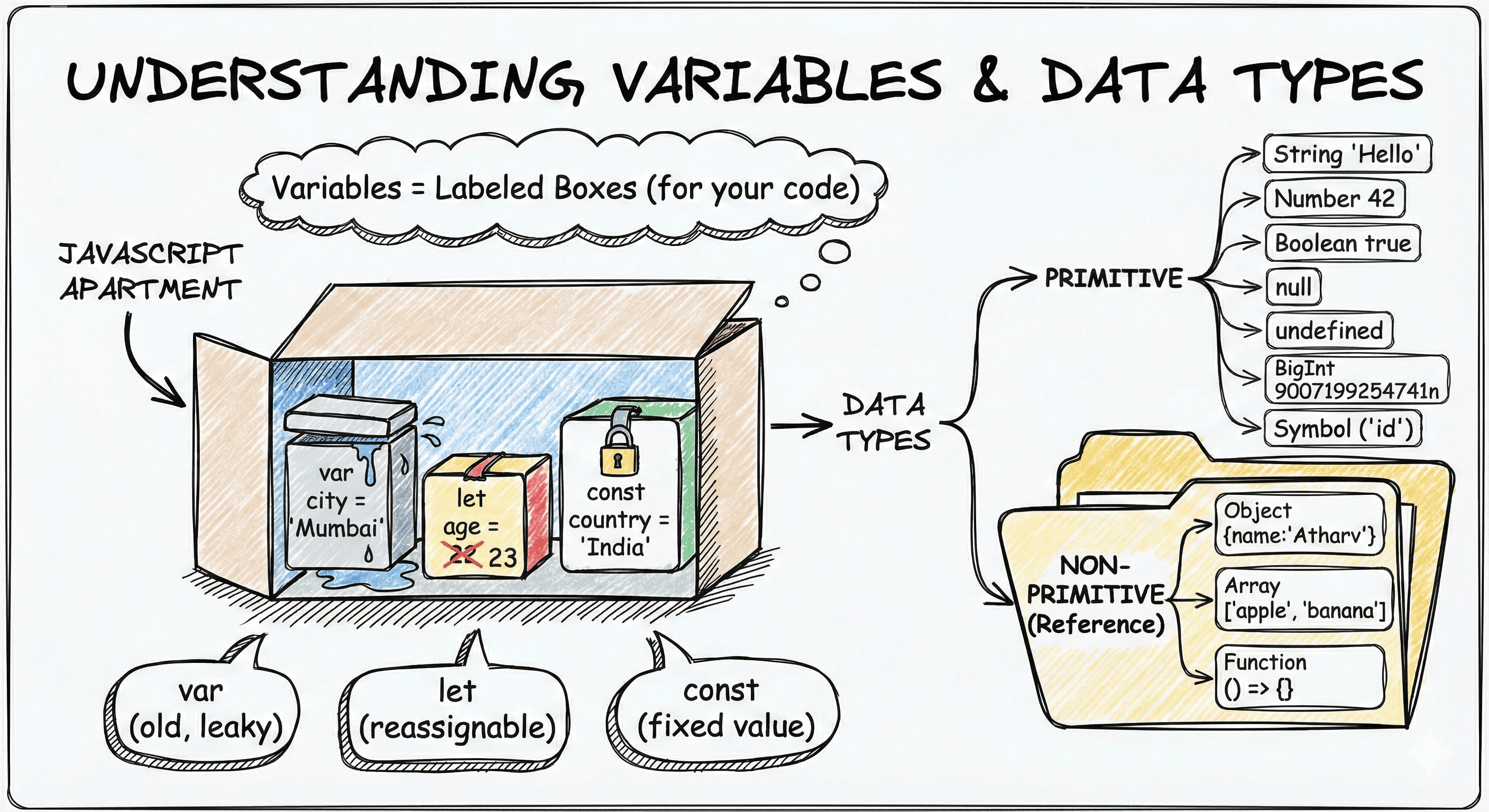
Imagine you are moving into a new apartment. You have a bunch of labeled boxes one says "Books", another says "Kitchen Stuff", and one says "Do Not Open". Each box holds something specific, and the label helps you (and everyone else) know what is inside without unpacking everything. Variables in JavaScript work exactly the same way. A variable is a labeled box in your program's memory that holds a piece of information you want to use later.
You could technically hardcode every single value in your program write "Atharv" every time you need a name, or 25 every time you need an age. But what happens when that name changes, or you want the same logic to work for a different person? You would have to hunt down and update every single occurrence. Variables let you define a value once and reference it by name everywhere. That is the entire point.
Declaring Variables: var, let, and const
JavaScript gives you three ways to create (declare) a variable: var, let, and const. They all do the same fundamental thing name a box and put something in it but they behave differently in important ways.
var city = "Mumbai";
let age = 22;
const country = "India";
var
var is the original way to declare variables in JavaScript, dating back to 1995. It works, but it has quirks that have caused countless bugs over the years, which is why modern JavaScript introduced let and const.
var score = 100;
score = 200; // allowed  you can reassign
console.log(score); // 200
let
let is the modern replacement for var in most situations. Use it when you know the value will change over time.
let playerName = "Atharv";
playerName = "Rohan"; // allowed  let can be reassigned
console.log(playerName); // "Rohan"
const
const is short for "constant." Once you assign a value to a const variable, you cannot reassign it.
const PI = 3.14159;
PI = 3; // TypeError: Assignment to constant variable
However, this rule applies to the variable binding, not the contents of objects or arrays.
const user = { name: "Atharv" };

user.name = "Rohan"; // allowed
console.log(user.name); // "Rohan"

user = {}; // TypeError: Assignment to constant variable
Think of const as locking the variable name to a specific value in memory. If that value is an object, the object's internal properties can still change.
Use const by default. Only reach for let when you actually need to change the value. Avoid var in modern code.
How JavaScript actually processes variables
JavaScript executes code in two phases:
Creation phase:
The engine registers variables in memory.
Conceptually:
var a = undefined;
let b = <uninitialized>;
const c = <uninitialized>;
Execution phase:
The engine runs the code line by line and assigns values.
a = 10;
b = 20;
c = 30;
Accessing a variable while it is still uninitialized results in a ReferenceError. This is the Temporal Dead Zone.
Temporal Dead Zone (TDZ)
Variables declared with let and const are hoisted, but they are not initialized immediately. The time between entering the scope and the line where the variable is initialized is called the Temporal Dead Zone (TDZ).
During the TDZ, accessing the variable throws a ReferenceError.
{
  console.log(a); // undefined
  var a = 10;
}

{
  console.log(b); // ReferenceError: Cannot access 'b' before initialization
  let b = 20;
}

{
  console.log(c); // ReferenceError: Cannot access 'c' before initialization
  const c = 30;
}
The key difference is that var is initialized with undefined immediately, while let and const remain uninitialized until execution reaches their declaration line.
var vs let vs const at a Glance
| Feature | var | let | const |
|---|---|---|---|
| Can be reassigned | Yes | Yes | No |
| Scope | Function | Block | Block |
| Hoisted | Yes (initialized to undefined) | Yes (hoisted but uninitialized TDZ exists until initialization) | Yes (hoisted but uninitialized TDZ exists until initialization) |
| Access before initialization | Returns undefined | Throws ReferenceError (TDZ) | Throws ReferenceError (TDZ) |
| Must initialize at declaration | No | No | Yes |
| Recommended today | No | Yes | Yes (preferred) |
Primitive Data Types
Every variable holds a value, and every value has a type. JavaScript has seven primitive types five you will use in almost every program, and two more specialized ones worth knowing.
String
A string is any text wrapped in quotes single, double, or backtick (template literal).
let firstName = "Atharv";
let greeting = "Hello, world!";
let message = `Welcome, ${firstName}`; // template literal
Strings represent names, messages, emails, URLs anything text-based.
Number
JavaScript has a single number type for both integers and decimals.
let age = 22;
let temperature = 36.6;
let negativeBalance = -500;
Unlike some languages, there is no separate int or float type in JavaScript. It is all just number.
Boolean
A boolean holds one of two values: true or false. Think of it as a light switch either on or off.
let isLoggedIn = true;
let hasSubscription = false;
Booleans are the backbone of all conditional logic in your programs.
null
null means "intentionally empty." You assign it yourself to say "this variable exists, but right now it holds nothing."
let selectedUser = null; // no user selected yetIt is an explicit, deliberate absence of value.
undefined
undefined means a variable has been declared but no value has been assigned to it yet. JavaScript sets this automatically.
let pendingOrder;
console.log(pendingOrder); // undefined
The key difference: null is when you decide a value is empty. undefined is when JavaScript does not find a value at all.
BigInt
JavaScript's number type can safely represent integers only up to $2^ - 1$ (about 9 quadrillion). For anything larger cryptography, financial calculations, working with database IDs from systems that use 64-bit integers you need BigInt. You create one by appending n to the end of an integer literal.
const bigNumber = 9007199254740991n; // Number.MAX_SAFE_INTEGER as BigInt
const result = 9007199254740991n + 1n;
console.log(result); // 9007199254740992n
Note that you cannot mix BigInt and regular number in arithmetic without explicit conversion.
console.log(10n + 5); // TypeError: Cannot mix BigInt and other types
console.log(10n + 5n); // 15n  this is fine
Symbol
A Symbol is a guaranteed-unique value. Every time you call Symbol(), you get a brand new value that will never equal any other value even another Symbol() with the same description.
const id1 = Symbol("id");
const id2 = Symbol("id");

console.log(id1 === id2); // false  always unique
Symbols are mainly used as unique property keys on objects to avoid naming collisions, especially in libraries and frameworks. As a beginner you will rarely need to create them yourself, but knowing they exist helps when you encounter them in codebases.
All 7 Primitive Types at a Glance
────────────────────────────────────────
  "Hello"         → string
  42              → number
  true / false    → boolean
  null            → intentional empty
  undefined       → no value assigned
  9007199254741n  → bigint
  Symbol("id")    → symbol
────────────────────────────────────────
Non-Primitive Data Types
Primitive values are single, simple pieces of data. Non-primitives (also called reference types) can hold collections of values or more complex structures. JavaScript has three you will use constantly.
Think of a primitive as a sticky note with one fact written on it. A non-primitive is more like a folder it can hold many sticky notes inside it.
Object
An object groups related data together under one name using key-value pairs. Instead of having separate variables for a person's name, age, and city, you can bundle them into one object.
const person = {
  name: "Atharv",
  age: 22,
  isStudent: true,
};

console.log(person.name); // "Atharv"
console.log(person.age); // 22
You access values using dot notation (person.name) or bracket notation (person["name"]). Objects are the most fundamental data structure in JavaScript almost everything, including arrays and functions, is an object under the hood.
Array
An array is an ordered list of values. Use it when you have multiple items of the same kind a list of names, a set of scores, a collection of URLs.
const fruits = ["apple", "banana", "mango"];

console.log(fruits[0]); // "apple"  (arrays are zero-indexed)
console.log(fruits[2]); // "mango"
console.log(fruits.length); // 3
Arrays are zero-indexed, meaning the first item sits at position 0, not 1. This trips up almost every beginner at least once.
Function
A function is a reusable block of code you can define once and call many times. In JavaScript, functions are also values you can assign them to variables, pass them as arguments, and return them from other functions.
function greet(name) {
  return "Hello, " + name + "!";
}

console.log(greet("Atharv")); // "Hello, Atharv!"
console.log(greet("Rohan")); // "Hello, Rohan!"
You can also write functions as expressions and assign them to variables:
const greet = function (name) {
  return "Hello, " + name + "!";
};

// or using arrow function syntax
const greetArrow = (name) => "Hello, " + name + "!";
Primitive vs Non-Primitive
──────────────────────────────────────────────────────
Primitive Non-Primitive
───────────────── ─────────────────────────
Stores a single value Stores a collection / logic
Copied by value Copied by reference
Immutable Mutable
string "Atharv" Object { name: "Atharv" }
number 22 Array [1, 2, 3]
boolean true Function () => {}
null
undefined
bigint 9n
symbol Symbol("id")
──────────────────────────────────────────────────────
Beginner tip: "Copied by value" means if you copy a primitive, you get a brand new independent copy. "Copied by reference" means if you copy an object or array, both variables point to the same thing in memory changing one changes the other. This distinction becomes very important as you write more complex programs.
Understanding Scope
Scope determines where in your code a variable can be accessed. Think of it like rooms in a house. A book kept in the living room can be accessed by anyone in the house. A book kept in your bedroom can only be accessed from your bedroom.
There are two types of scope you should know right now:
Global scope declared outside any function or block, accessible everywhere.
Block scope declared inside { } (like an if block or a for loop), accessible only inside that block.
let globalMessage = "I am available everywhere";

if (true) {
  let blockMessage = "I only exist inside this block";
  console.log(globalMessage); // works fine
  console.log(blockMessage); // works fine
}

console.log(globalMessage); // works fine
console.log(blockMessage); // ReferenceError: blockMessage is not defined
let and const are block-scoped. var is function-scoped, which means it leaks out of blocks like if and for one of the main reasons it causes unexpected bugs.
Scope Visualization
──────────────────────────────────────────────
  Global Scope
  ┌─────────────────────────────────────────┐
  │  let globalMessage = "..."              │
  │                                         │
  │  if (true) {    ← Block Scope           │
  │  ┌───────────────────────────────────┐  │
  │  │  let blockMessage = "..."         │  │
  │  │  // can access globalMessage ✓    │  │
  │  │  // can access blockMessage  ✓    │  │
  │  └───────────────────────────────────┘  │
  │                                         │
  │  // can access globalMessage ✓          │
  │  // blockMessage is gone here ✗         │
  └─────────────────────────────────────────┘
──────────────────────────────────────────────
The rule of thumb: always declare variables in the smallest scope they are needed in. It reduces bugs, avoids conflicts, and keeps your code predictable.
Putting It All Together: A Practical Example
Here is everything from this post in one small program:
// Strings
const name = "Atharv";

// Number
let age = 22;

// Boolean
let isStudent = true;

// null  no course selected yet
let currentCourse = null;

// Logging them
console.log(name); // "Atharv"
console.log(age); // 22
console.log(isStudent); // true
console.log(currentCourse); // null

// Updating let variables
age = 23;
isStudent = false;
console.log(age); // 23
console.log(isStudent); // false

// Trying to update const
const country = "India";
country = "USA"; // TypeError: Assignment to constant variable
Notice how let values update without complaint, while const throws an error the moment you try to reassign it.
Your Assignment
Try this in your browser console or a JavaScript sandbox like Programiz JS Compiler (opens in new tab) or the browser DevTools console (F12 → Console tab):
-
Declare three variables:
nameusingconstset it to your nameageusingletset it to your ageisStudentusingletset it totrueorfalse
-
Log all three to the console with
console.log() -
Update
ageto a different number and log it again -
Try reassigning
name(since it isconst) and see what error you get -
Declare a variable without assigning a value and log it notice it prints
undefined
const name = "Your Name";
let age = 20;
let isStudent = true;

console.log(name, age, isStudent);

age = 21;
console.log(age); // updated

name = "Another Name"; // what happens here?

let unassigned;
console.log(unassigned); // undefined
This small exercise will cement the difference between let and const better than any explanation can.
Key Takeaways
- A variable is a named container that stores a value in memory
- Use
constby default,letwhen you need to reassign, and avoidvarin modern code - JavaScript has seven primitive types:
string,number,boolean,null,undefined,bigint, andsymbol - Non-primitive types (
object,array,function) can hold multiple values and are copied by reference, not by value nullis an intentional empty value you assign yourself;undefinedmeans a value was never assigned- Scope controls where a variable lives and can be accessed
letandconstare block-scoped, which makes them more predictable thanvar - The best way to understand this is to open a console and try it yourself