JavaScript Polyfills, Prototypes, and Method Binding: Recreating Array Methods
Master JavaScript prototypes, understand call/apply/bind, and build spec-compliant polyfills for array methods like map, filter, and reduce.
A comprehensive guide to JavaScript's prototype system, function binding methods (call, apply, bind), and how to build your own polyfills for array methods like map, filter, and reduce.
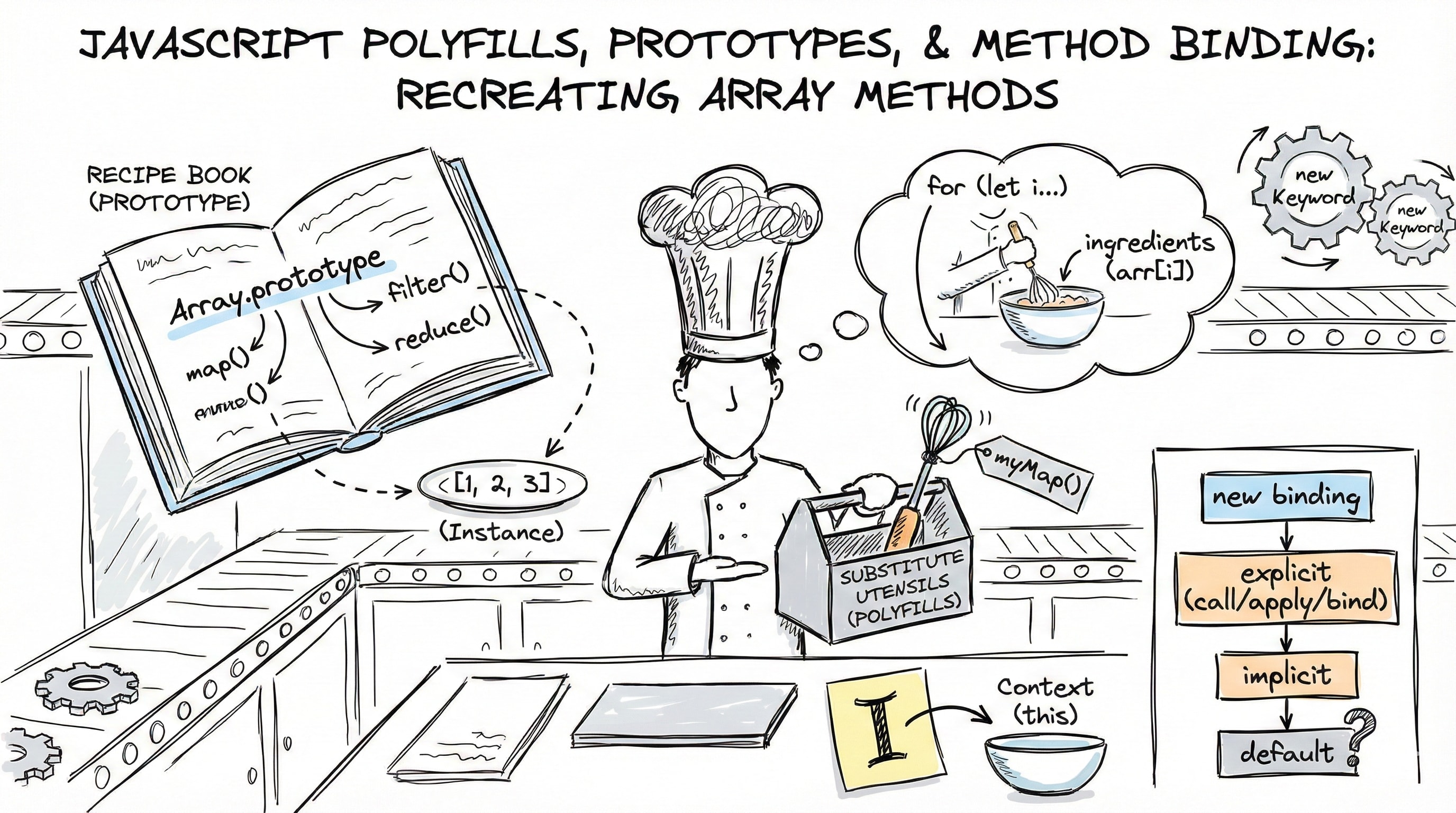
Imagine you're a chef in a kitchen where every dish comes with a recipe book. When you need to make a specific dish, you don't rewrite the entire recipe for each plate. You reference the original recipe book instead. If the kitchen doesn't have a particular utensil, you create a substitute that does the same job. This is exactly how JavaScript's prototype system and polyfills work: prototypes are the shared recipe books, and polyfills are the substitute utensils when something's missing.
The Prototype Chain: JavaScript's Inheritance Model
In JavaScript, objects don't carry all their methods with them. That would be wasteful. Instead, they reference a shared prototype object where methods live. Think of it like a family tree where children inherit traits from their parents.
┌────────────────────┐
│  [1, 2, 3]         │
│  (Array            │
│   instance)        │
└────────┬───────────┘
         │ [[Prototype]]
         ▼
┌────────────────────┐
│ Array.prototype    │
│  • map()           │
│  • filter()        │
│  • reduce()        │
└────────┬───────────┘
         │ [[Prototype]]
         ▼
┌────────────────────┐
│ Object.prototype   │
│  • toString()      │
│  • hasOwnProperty()│
└────────────────────┘
When you call [1, 2, 3].map(fn), JavaScript first checks if the array instance has a map property. It doesn't. So JavaScript looks up the prototype chain to Array.prototype, finds map, and executes it. This lookup continues until it reaches Object.prototype or returns undefined.
Beginner insight: This is why all arrays have the same methods without needing to define them individually.
Intermediate insight: The prototype chain is JavaScript's implementation of prototypal inheritance, different from class-based inheritance in languages like Java or C++.
Advanced insight: This lookup has performance implications. Properties found early in the chain are accessed faster. For hot code paths, you might cache method references: const map = Array.prototype.map.
The this Keyword: Context is Everything
Think of this like a pronoun in language. When someone says "I am hungry," the "I" refers to whoever is speaking. Similarly, this in JavaScript refers to the context in which a function is called.
const person = {
  name: "Alice",
  greet: function () {
    console.log(`Hello, I'm ${this.name}`);
  },
};

person.greet(); // "Hello, I'm Alice"
const greetFn = person.greet;
greetFn(); // "Hello, I'm undefined" (this is global/undefined)
The golden rule: this is determined by HOW a function is called, not WHERE it's defined.
Here's the hierarchy of this binding:
┌──────────────────────────────────┐
│  new binding (highest)           │
│  const obj = new Fn()            │
│  → this = newly created object   │
└──────────────────────────────────┘
           ↓
┌──────────────────────────────────┐
│  Explicit binding                │
│  fn.call(obj) / fn.apply(obj)    │
│  → this = obj                    │
└──────────────────────────────────┘
           ↓
┌──────────────────────────────────┐
│  Implicit binding                │
│  obj.method()                    │
│  → this = obj                    │
└──────────────────────────────────┘
           ↓
┌──────────────────────────────────┐
│  Default binding (lowest)        │
│  fn()                            │
│  → this = global/undefined       │
└──────────────────────────────────┘
call, apply, and bind: Taking Control of Context
These three methods let you explicitly set what this refers to inside a function. Think of them like choosing who gets to be the "I" in a sentence.
call() - Individual Arguments
function introduce(greeting, punctuation) {
  console.log(`${greeting}, I'm ${this.name}${punctuation}`);
}

const user = { name: "Bob" };
introduce.call(user, "Hey", "!"); // "Hey, I'm Bob!"
call is like making a phone call with specific information: you dial (the function), specify who's speaking (first argument = this), and pass individual pieces of information (remaining arguments).
apply() - Array of Arguments
introduce.apply(user, ["Hey", "!"]); // "Hey, I'm Bob!"apply is identical to call, except arguments come in an array. Before ES6 spread syntax, this was crucial for functions taking variable arguments.
Practical use case:
const numbers = [5, 6, 2, 3, 7];
const max = Math.max.apply(null, numbers); // 7
// Modern equivalent: Math.max(...numbers)
bind() - Create a Bound Function
const boundIntroduce = introduce.bind(user, "Hello");
boundIntroduce("!!!"); // "Hello, I'm Bob!!!"
bind doesn't call the function immediately. Instead, it returns a new function with this permanently set. This is like creating a personalized greeting card template where the recipient (context) is locked in, but you can still add more details later.
Real-world scenario:
const person = {
  name: "Charlie",
  greet: function () {
    console.log(`Hi, I'm ${this.name}`);
  },
};

// Without bind, 'this' is lost
setTimeout(person.greet, 1000); // "Hi, I'm undefined"

// With bind, 'this' is preserved
setTimeout(person.greet.bind(person), 1000); // "Hi, I'm Charlie"
This happens because setTimeout calls the function in a different context. Using bind ensures this always refers to person.
Key differences:
callandapplyinvoke immediately;bindreturns a new functioncalltakes individual arguments;applytakes an arraybindallows partial application (pre-filling arguments)
The new Keyword: Object Construction Magic
When you use new with a function, JavaScript performs four automatic steps. It's like an assembly line for creating objects:
new Person("Alice")
         ↓
┌──────────────────────────┐
│ 1. Create empty object   │
│    const obj = {}        │
└────────┬─────────────────┘
         ↓
┌──────────────────────────┐
│ 2. Set prototype link    │
│    obj.[[Prototype]] =   │
│    Person.prototype      │
└────────┬─────────────────┘
         ↓
┌──────────────────────────┐
│ 3. Call function with    │
│    this = obj            │
│    Person.call(obj, ...) │
└────────┬─────────────────┘
         ↓
┌──────────────────────────┐
│ 4. Return obj            │
│    (unless function      │
│     returns object)      │
└──────────────────────────┘
Example:
function Person(name) {
  this.name = name;
}

Person.prototype.greet = function () {
  return `Hi, I'm ${this.name}`;
};

const alice = new Person("Alice");
alice.greet(); // "Hi, I'm Alice"
Beginner insight: new creates a fresh object and sets up the prototype chain automatically.
Advanced insight: If the constructor explicitly returns an object, that object is returned instead of the newly created one. Returning primitives is ignored.
Building Polyfills: Filling the Gaps
A polyfill is code that implements a feature on browsers that don't support it natively. It's like creating a substitute ingredient when you're missing something in your kitchen. It should taste the same, even if made differently.
The Universal Polyfill Pattern
Every array method polyfill follows this structure:
Object.defineProperty(Array.prototype, "myMethod", {
  value: function (callback, thisArg) {
    // 1. Validate context
    if (this == null) {
      throw new TypeError("Called on null or undefined");
    }

    // 2. Validate callback
    if (typeof callback !== "function") {
      throw new TypeError("Callback must be a function");
    }

    // 3. Convert to object
    const arr = Object(this);

    // 4. Iterate with proper handling
    for (let i = 0; i < arr.length; i++) {
      // Skip holes in sparse arrays
      if (i in arr) {
        callback.call(thisArg, arr[i], i, arr);
      }
    }
  },
  enumerable: false, // native methods are non-enumerable
  writable: true,
  configurable: true,
});
Why Object.defineProperty instead of direct assignment?
Direct assignment (Array.prototype.myMap = fn) creates an enumerable property. That means your custom method unexpectedly shows up in for...in loops:
const arr = [1, 2, 3];
for (let key in arr) {
  console.log(key); // "0", "1", "2", and... "myMethod" — surprise!
}
Native methods like map, filter, and reduce are non-enumerable. Using Object.defineProperty with enumerable: false matches their behaviour exactly. This is also how production polyfill libraries like core-js (opens in new tab) do it.
Deep Dive: Implementing forEach()
forEach is the simplest of the iteration methods—it just executes a function for each element and returns undefined:
Object.defineProperty(Array.prototype, "myForEach", {
  value: function (callback, thisArg) {
    if (this == null) {
      throw new TypeError(
        "Cannot read property 'myForEach' of null or undefined",
      );
    }

    if (typeof callback !== "function") {
      throw new TypeError(callback + " is not a function");
    }

    const arr = Object(this);

    for (let i = 0; i < arr.length; i++) {
      if (i in arr) {
        callback.call(thisArg, arr[i], i, arr);
      }
    }
  },
  enumerable: false,
  writable: true,
  configurable: true,
});

// Usage example
const fruits = ["apple", "banana", "cherry"];
fruits.myForEach((fruit) => console.log(fruit));
// Logs: "apple", "banana", "cherry"
Implementing map()
Object.defineProperty(Array.prototype, "myMap", {
  value: function (callback, thisArg) {
    if (this == null) {
      throw new TypeError("Cannot read property 'myMap' of null or undefined");
    }

    if (typeof callback !== "function") {
      throw new TypeError(callback + " is not a function");
    }

    const arr = Object(this);
    const result = [];

    for (let i = 0; i < arr.length; i++) {
      // The 'in' operator checks if index exists
      // This handles sparse arrays correctly
      if (i in arr) {
        // Use .call() to set 'this' in callback
        result[i] = callback.call(thisArg, arr[i], i, arr);
      }
    }

    return result;
  },
  enumerable: false,
  writable: true,
  configurable: true,
});

// Usage example
const numbers = [1, 2, 3];
const doubled = numbers.myMap((n) => n * 2);
console.log(doubled); // [2, 4, 6]
Understanding this vs thisArg:
This can be confusing because there are TWO different contexts at play:
this- The array that.myMap()is called onthisArg- Whatthisshould be inside the callback function
const numbers = [1, 2, 3];
const multiplier = {
  factor: 10,
  multiply: function (num) {
    return num * this.factor; // 'this' here is determined by thisArg
  },
};

// Without thisArg: 'this.factor' is undefined in callback
numbers.myMap(multiplier.multiply); // [NaN, NaN, NaN]

// With thisArg: 'this.factor' refers to multiplier.factor
numbers.myMap(multiplier.multiply, multiplier); // [10, 20, 30]
The callback.call(thisArg, ...) line sets the callback's context. If thisArg is not provided, it's undefined, which makes this in the callback either the global object (in non-strict mode) or undefined (in strict mode).
Why Object(this)? Converting to an object ensures the code works even if called on non-array objects, maintaining spec compliance.
Why i in arr? Sparse arrays like [1, , 3] have holes. Native methods skip these holes, and so should our polyfills.
Why result[i] instead of result.push()? To preserve sparseness: [1, , 3].map(x => x * 2) should return [2, , 6], not [2, 6].
Implementing filter()
Similar to map, but instead of transforming elements, filter conditionally adds them to a new array:
Object.defineProperty(Array.prototype, "myFilter", {
  value: function (callback, thisArg) {
    if (this == null) {
      throw new TypeError(
        "Cannot read property 'myFilter' of null or undefined",
      );
    }

    if (typeof callback !== "function") {
      throw new TypeError(callback + " is not a function");
    }

    const arr = Object(this);
    const result = [];

    for (let i = 0; i < arr.length; i++) {
      if (i in arr) {
        // If the callback returns truthy, push the element to result
        if (callback.call(thisArg, arr[i], i, arr)) {
          result.push(arr[i]);
        }
      }
    }

    return result;
  },
  enumerable: false,
  writable: true,
  configurable: true,
});

// Usage example
const ages = [15, 21, 16, 30];
const adults = ages.myFilter((age) => age >= 18);
console.log(adults); // [21, 30]
Key difference: Unlike map which preserves sparseness by directly assigning result[i], filter uses push() because the resulting array shouldn't have holes, even if the original did.
Implementing reduce()
reduce is unique because it has an accumulator:
Object.defineProperty(Array.prototype, "myReduce", {
  value: function (callback, initialValue) {
    if (this == null) throw new TypeError();
    if (typeof callback !== "function") throw new TypeError();

    const arr = Object(this);
    let accumulator;
    let startIndex;

    // Check if initial value was provided
    if (arguments.length > 1) {
      accumulator = initialValue;
      startIndex = 0;
    } else {
      // No initial value: find first valid element
      let found = false;
      for (startIndex = 0; startIndex < arr.length; startIndex++) {
        if (startIndex in arr) {
          accumulator = arr[startIndex];
          found = true;
          startIndex++; // Move past the first valid element
          break;
        }
      }

      if (!found) {
        throw new TypeError("Reduce of empty array with no initial value");
      }
    }

    for (let i = startIndex; i < arr.length; i++) {
      if (i in arr) {
        accumulator = callback(accumulator, arr[i], i, arr);
      }
    }

    return accumulator;
  },
  enumerable: false,
  writable: true,
  configurable: true,
});

// Usage example
const expenses = [50, 20, 100];
const total = expenses.myReduce((acc, curr) => acc + curr, 0);
console.log(total); // 170
Tricky detail: When no initial value is provided, the first array element becomes the accumulator, and iteration starts from index 1.
Short-Circuiting Methods: some() and every()
Unlike map and filter, these methods can stop early:
Object.defineProperty(Array.prototype, "mySome", {
  value: function (callback, thisArg) {
    if (this == null) throw new TypeError();
    if (typeof callback !== "function") throw new TypeError();

    const arr = Object(this);

    for (let i = 0; i < arr.length; i++) {
      if (i in arr) {
        // Return immediately when condition is met
        if (callback.call(thisArg, arr[i], i, arr)) {
          return true;
        }
      }
    }

    return false;
  },
  enumerable: false,
  writable: true,
  configurable: true,
});

Object.defineProperty(Array.prototype, "myEvery", {
  value: function (callback, thisArg) {
    if (this == null) throw new TypeError();
    if (typeof callback !== "function") throw new TypeError();

    const arr = Object(this);

    for (let i = 0; i < arr.length; i++) {
      if (i in arr) {
        // Return immediately when condition fails
        if (!callback.call(thisArg, arr[i], i, arr)) {
          return false;
        }
      }
    }

    return true;
  },
  enumerable: false,
  writable: true,
  configurable: true,
});

// Usage examples
const numberList = [2, 4, 6, 8, 10];
console.log(numberList.mySome((n) => n > 5)); // true
console.log(numberList.myEvery((n) => n % 2 === 0)); // true
Vacuous truth insight: An empty array returns true for every because there are no elements to fail the test. This follows formal logic: "all elements in an empty set satisfy any condition."
Implementing flat()
Flattening arrays requires recursion:
Object.defineProperty(Array.prototype, "myFlat", {
  value: function (depth = 1) {
    if (this == null) throw new TypeError();

    const flatten = (arr, currentDepth) => {
      const result = [];

      for (let i = 0; i < arr.length; i++) {
        if (!(i in arr)) continue;

        const value = arr[i];

        if (Array.isArray(value) && currentDepth > 0) {
          result.push(...flatten(value, currentDepth - 1));
        } else {
          result.push(value);
        }
      }

      return result;
    };

    return flatten(Object(this), depth);
  },
  enumerable: false,
  writable: true,
  configurable: true,
});

// Usage example
const nested = [1, [2, 3], [[4, 5]]];
console.log(nested.myFlat(1)); // [1, 2, 3, [4, 5]]
console.log(nested.myFlat(2)); // [1, 2, 3, 4, 5]
Design choice: We use a helper function to track depth recursively while keeping the outer API clean.
Common Pitfalls and Best Practices
1. Never modify prototypes in production code
// Bad: Pollutes global scope
Array.prototype.myCustomMethod = function() { ... };

// Good: Use utility functions
function myCustomMethod(arr) { ... }
2. Always check for existing implementations
if (!Array.prototype.map) {
  Array.prototype.map = function() { ... };
}
3. Handle edge cases religiously
- Null/undefined context
- Non-function callbacks
- Empty arrays
- Sparse arrays
- Missing
thisArg
Key Takeaways
- Prototypes are JavaScript's shared memory for methods objects reference them rather than copying
thisbinding follows a hierarchy: new > explicit (call/apply/bind) > implicit (obj.method) > default- call invokes immediately with individual arguments; apply uses an array; bind returns a bound function
- Polyfills recreate missing native functionality, requiring careful edge case handling
- Sparse array handling with
i in arris crucial for spec compliance - Short-circuiting in
some/everyprovides performance benefits over full iteration - Understanding these fundamentals makes you better at debugging, library code, and interview questions