Callbacks in JavaScript: Why They Exist
Learn what callbacks are in JavaScript, why they are used in asynchronous programming, and why callback nesting became a problem.
Callbacks are one of the oldest and most important patterns in JavaScript. This post explains what callback functions are, why JavaScript uses them so heavily in asynchronous code, how passing functions as values works, where callbacks show up in real applications, and why nested callbacks eventually became a problem.
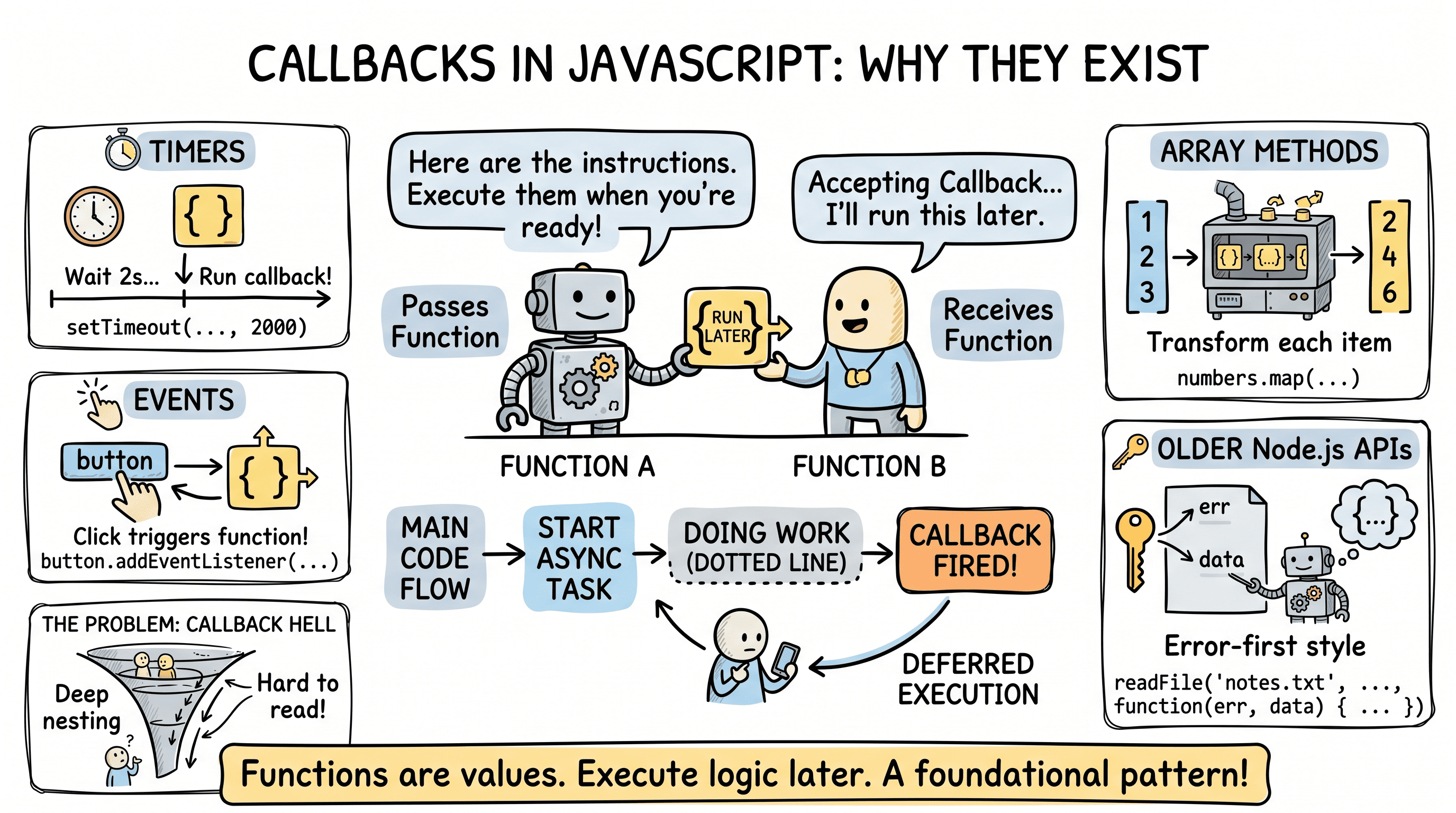
Imagine you hand a friend your house keys and say, "When the delivery person arrives, call me." You are giving them instructions to run later, not right now. That is the core idea behind a callback in JavaScript: one function is handed to another function so it can be executed later when the right moment arrives.
Callbacks sound simple because they are simple. But they sit underneath event handling, timers, array methods, file operations, and the entire history of asynchronous JavaScript. If you understand callbacks well, promises and async/await become much easier to understand too.
Functions Are Values in JavaScript
Before talking about callbacks, you need one core idea: in JavaScript, functions are values. That means you can store them in variables, pass them to other functions, and return them from functions.
function sayHello() {
  console.log("Hello");
}

const greet = sayHello;

greet(); // Hello
We did not call sayHello when assigning it to greet. We passed the function itself, not the result of running it.
That distinction matters:
sayHello; // function value
sayHello(); // function execution
If JavaScript did not treat functions like values, callbacks would not exist.
What a Callback Function Is
A callback is just a function passed into another function so it can be called later, often after some work is done.
function processUserInput(name, callback) {
  const formattedName = name.trim().toUpperCase();
  callback(formattedName);
}

processUserInput(" atharv ", function (result) {
  console.log(result); // ATHARV
});
Here, the anonymous function is the callback. processUserInput decides when to call it and what data to pass into it.
You can picture it like this:
┌──────────────────────┐
│ processUserInput()   │
│                      │
│ 1. receive name      │
│ 2. format name       │
│ 3. call callback     │
└──────────┬───────────┘
           │
           ▼
┌──────────────────────┐
│ callback(result)     │
│ prints ATHARV        │
└──────────────────────┘
This is the most important beginner-friendly definition: a callback is not a special JavaScript keyword or feature. It is a normal function used in a particular way.
Passing Functions as Arguments
Since functions are values, you can pass them as arguments exactly like strings, numbers, or objects.
function doMath(a, b, operation) {
  return operation(a, b);
}

function add(x, y) {
  return x + y;
}

function multiply(x, y) {
  return x * y;
}

console.log(doMath(2, 3, add)); // 5
console.log(doMath(2, 3, multiply)); // 6
The callback makes doMath flexible. Instead of hardcoding one behavior, it lets the caller decide what should happen.
This is one reason callbacks exist in the first place: they let one function customize another function's behavior without rewriting it.
For intermediate developers, this is a form of abstraction. The outer function owns the workflow. The callback injects the specific logic.
Why Callbacks Are Used in Asynchronous Programming
Now we get to the historical reason callbacks became so central in JavaScript.
JavaScript runs code on a single main thread in many common environments. If a task takes time, like waiting for a timer, reading a file, or fetching data from an API, JavaScript cannot just freeze everything until that task finishes. The application would become unresponsive.
So instead, JavaScript starts the async task and says, in effect, "When this is done, run this callback."
console.log("Start");

setTimeout(function () {
  console.log("Timer finished");
}, 2000);

console.log("End");
Output:
Start
End
Timer finished
That output tells the full story. JavaScript does not wait at setTimeout. It registers the callback, continues running other code, and later executes the callback when the timer completes.
Main code flow:

console.log("Start")
setTimeout(callback, 2000)
console.log("End")

Later:
callback() runs
This is why callbacks matter so much in asynchronous programming. They are the mechanism that says, "Run this code later when the async work is complete."
Common Callback Scenarios
Callbacks appear everywhere in JavaScript, not just in old async code.
1. Timers
setTimeout(function () {
  console.log("Runs once after delay");
}, 1000);
The callback runs after the timer finishes.
2. Event Handling
button.addEventListener("click", function () {
  console.log("Button clicked");
});
The browser stores the callback and runs it whenever the click event happens.
3. Array Methods
const numbers = [1, 2, 3];

const doubled = numbers.map(function (num) {
  return num * 2;
});

console.log(doubled); // [2, 4, 6]
map uses a callback to decide how each item should be transformed.
4. Older Node.js APIs
readFile("notes.txt", "utf8", function (err, data) {
  if (err) {
    console.error(err);
    return;
  }

  console.log(data);
});
This is the classic error-first callback style used heavily in Node.js: the first argument is the error, and the second is the successful result.
These examples show something important: callbacks are not only about waiting. They are also about handing over behavior.
Why Callbacks Feel Natural in JavaScript
Callbacks fit JavaScript well because the language leans heavily on small functions, event-driven programming, and asynchronous workflows.
If you click a button, a callback runs. If a timer finishes, a callback runs. If an array method processes an item, a callback runs. If a file read completes, a callback runs.
That consistency is useful. Once you understand the callback pattern, a lot of JavaScript APIs start feeling related instead of random.
For more advanced readers, callbacks are also a lightweight form of inversion of control. Instead of your code deciding exactly when every piece runs, you hand control to another system and provide a function for it to call back into your logic.
The Basic Problem of Callback Nesting
Callbacks are useful, but they become hard to manage when asynchronous tasks depend on each other in sequence.
getUser(userId, function (err, user) {
  if (err) {
    console.error(err);
    return;
  }

  getPosts(user.id, function (err, posts) {
    if (err) {
      console.error(err);
      return;
    }

    getComments(posts[0].id, function (err, comments) {
      if (err) {
        console.error(err);
        return;
      }

      console.log(comments);
    });
  });
});
This is the nesting problem people later called callback hell.
The issue is not that callbacks are bad. The issue is that deeply dependent workflows create several problems at once:
- indentation grows to the right
- error handling repeats at every level
- logic becomes harder to scan
- adding a new step becomes annoying
Here is the shape of the problem:
getUser(..., function () {
  getPosts(..., function () {
    getComments(..., function () {
      saveResult(..., function () {
        notifyUser(...)
      })
    })
  })
})
And visually:
┌─────────────┐
│ getUser     │
└──────┬──────┘
       ▼
┌─────────────┐
│ getPosts    │
└──────┬──────┘
       ▼
┌─────────────┐
│ getComments │
└──────┬──────┘
       ▼
┌─────────────┐
│ saveResult  │
└──────┬──────┘
       ▼
┌─────────────┐
│ notifyUser  │
└─────────────┘

Each step is waiting for the previous callback.
Structure becomes harder to read as the chain grows.
That pain is exactly why promises and later async/await became so popular. They did not eliminate callbacks from JavaScript completely. They gave developers cleaner ways to organize async flows built on the same underlying idea of "do this when ready."
Common Doubts About Callbacks
One common doubt is: are callbacks only for asynchronous code? No.
Array methods like map, filter, and forEach use callbacks synchronously. The outer function simply calls your callback during its own current execution.
Another common doubt is: are callbacks outdated now that we have promises and async/await? Also no.
Callbacks still matter because:
- events still use them
- timers still use them
- array methods still use them
- many APIs still accept them
- promises themselves rely on callback-style handlers like
.then()and.catch()
So callbacks are not obsolete. They are foundational.
Callback vs Calling a Function Immediately
Beginners often make this mistake:
setTimeout(showMessage(), 1000); // wrongThat calls showMessage immediately and passes its result to setTimeout, which is not what you want.
The correct version is:
setTimeout(showMessage, 1000); // correctOr:
setTimeout(function () {
  showMessage();
}, 1000);
The rule is simple: if you want something to run later, pass the function itself, not the result of running it now.
Key Takeaways
Callbacks exist because JavaScript treats functions as values and because many tasks need code that can be executed later. A callback is just a function passed to another function, often so it can run after some work finishes. This pattern shows up in timers, events, array methods, and older asynchronous APIs all across the language.
The real limitation of callbacks is not the concept itself, but how messy dependent async flows become when callbacks are deeply nested. Once you understand that, the evolution of JavaScript async patterns makes sense: callbacks came first, promises improved structure, and async/await improved readability again. But the core idea, giving one function another function to call at the right time, is still everywhere.