URL Parameters vs Query Strings in Express.js
Learn the difference between URL parameters and query strings in Express.js, how to access them with req.params and req.query.
URL parameters and query strings both live in the URL, but they serve very different purposes. This post breaks down what each one is, how to access them in Express.js, and when to use which.
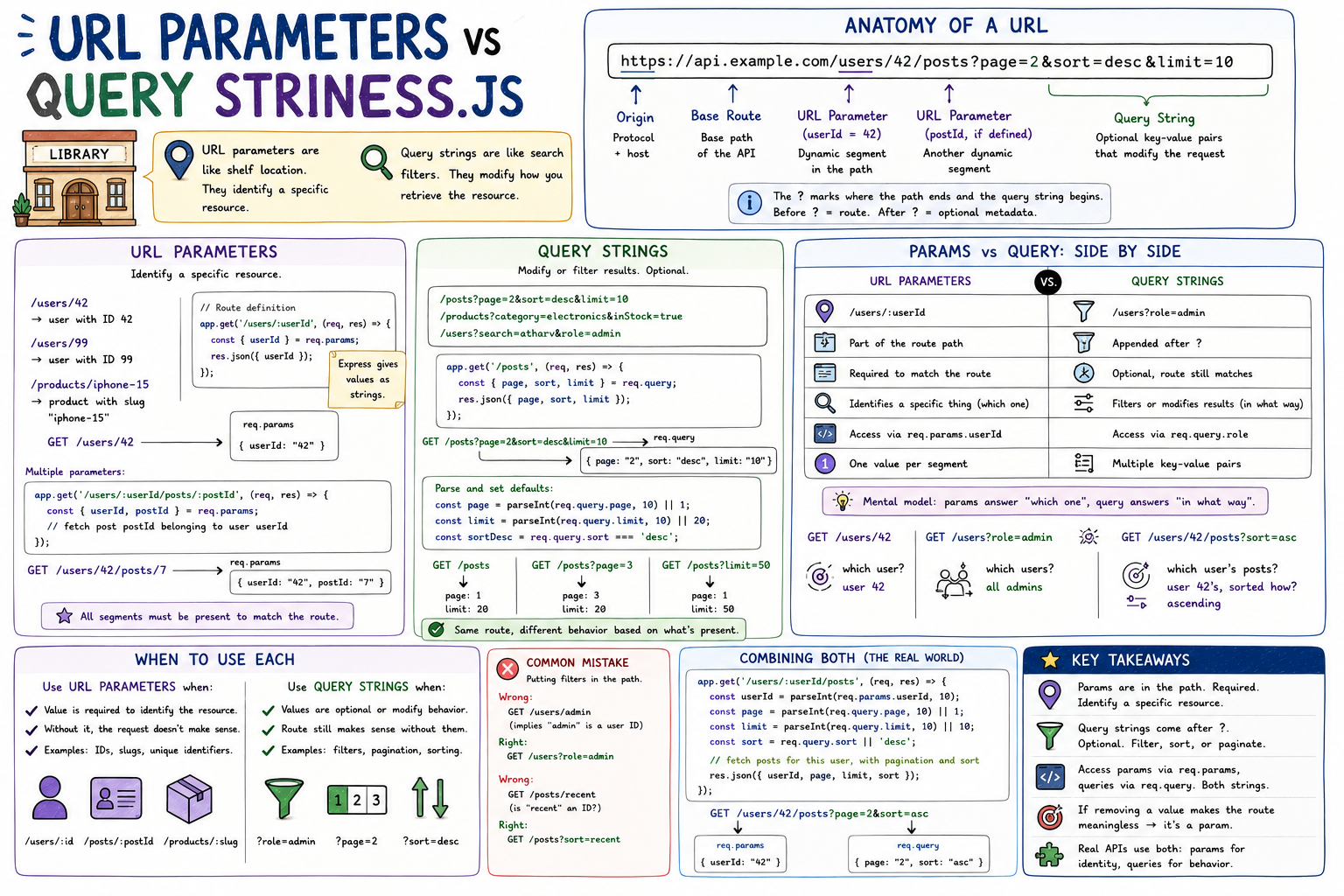
Think of a library. You walk in and say "I want shelf 7, row 3." That's a location, an identifier. It points to one specific thing. Now imagine you're at a book search terminal and you type "science fiction, published after 2010, sorted by rating." Those are filters. They modify the search. URL parameters work like the shelf location: they identify a specific resource. Query strings work like the filters: they modify how you retrieve it.
Anatomy of a URL
Before jumping to Express, let's see where both concepts live in a URL:
https://api.example.com/users/42/posts?page=2&sort=desc&limit=10
│                       │     │  │    │                          │
│                       │     │  │    └── Query String ──────────┘
│                       │     │  └─────── URL Parameter (postId, if defined)
│                       │     └────────── URL Parameter (userId = 42)
│                       └──────────────── Base Route
└──────────────────────────────────────── Origin
The ? marks where the path ends and the query string begins. Everything before it is part of the route. Everything after it is optional metadata.
URL Parameters
URL parameters are dynamic segments embedded directly in the route path. They identify which specific resource you're requesting.
/users/42          → user with ID 42
/users/99          → user with ID 99
/products/iphone-15 → product with slug "iphone-15"
In Express, you define a parameter by prefixing a segment with ::
// Route definition
app.get("/users/:userId", (req, res) => {
  const { userId } = req.params;
  res.json({ userId });
});
Hit /users/42 and req.params gives you:
{
  userId: "42";
}
Note: Express gives you the value as a string. If you need it as a number, convert it:
const userId = parseInt(req.params.userId, 10);You can chain multiple parameters in one route:
app.get("/users/:userId/posts/:postId", (req, res) => {
  const { userId, postId } = req.params;
  // fetch post postId belonging to user userId
});
GET /users/42/posts/7
req.params → { userId: "42", postId: "7" }The route will only match if both segments are present. A request to /users/42/posts would fall through to a different handler or return 404.
Query Strings
Query strings are key-value pairs appended after the ?. They're optional and don't affect which route matches. They modify what the route returns: filtering, sorting, pagination, search terms.
/posts?page=2&sort=desc&limit=10
/products?category=electronics&inStock=true
/users?search=atharv&role=admin
In Express, query strings live on req.query:
app.get("/posts", (req, res) => {
  const { page, sort, limit } = req.query;
  // page = "2", sort = "desc", limit = "10"
  res.json({ page, sort, limit });
});
All values are strings. For numbers and booleans, you'll need to parse:
app.get("/posts", (req, res) => {
  const page = parseInt(req.query.page, 10) || 1;
  const limit = parseInt(req.query.limit, 10) || 20;
  const sortDesc = req.query.sort === "desc";

  // fetch posts with pagination and sorting
});
Query params are optional by nature. The same route handles both:
GET /posts          → page defaults to 1, limit to 20
GET /posts?page=3   → page is 3, limit defaults to 20
No extra route definition needed. The route stays the same; the behavior adjusts based on what's present.
Params vs Query: Side by Side
┌──────────────────────────────┬──────────────────────────────┐
│       URL Parameters         │       Query Strings          │
├──────────────────────────────┼──────────────────────────────┤
│ /users/:userId               │ /users?role=admin            │
│ Part of the route path       │ Appended after ?             │
│ Required to match the route  │ Optional, route still matches│
│ Identifies a specific thing  │ Filters or modifies results  │
│ req.params.userId            │ req.query.role               │
│ One value per segment        │ Multiple key-value pairs     │
└──────────────────────────────┴──────────────────────────────┘
The clearest mental model: params answer "which one", query answers "in what way."
GET /users/42          → which user? user 42
GET /users?role=admin  → which users? all admins
GET /users/42/posts?sort=asc → which user's posts? user 42's. sorted how? ascending.
When to Use Each
Use URL parameters when:
The value is required to identify the resource. Without it, the request doesn't make sense.
// Makes sense: you need the ID to fetch a specific user
app.get('/users/:id', ...)

// Makes sense: you need both to fetch a specific comment on a specific post
app.get('/posts/:postId/comments/:commentId', ...)
Use query strings when:
The values are optional, or they modify the behavior of a request without changing which resource you're talking about.
// Pagination: optional, defaults exist
app.get('/posts', ...) // ?page=1&limit=20

// Search: the route is the same, the results differ
app.get('/products', ...) // ?search=keyboard&inStock=true&sort=price

// Filtering by relationship: still about /users as a collection
app.get('/users', ...) // ?role=admin&active=true
A common mistake: putting filters in the path.
Wrong:  GET /users/admin         (implies "admin" is a user ID)
Right:  GET /users?role=admin

Wrong:  GET /posts/recent        (is "recent" an ID? a slug?)
Right:  GET /posts?sort=recent
If you find yourself routing on a value that varies with user intent rather than resource identity, it belongs in the query string.
Combining Both
Real APIs almost always use both together. Here's a realistic example:
app.get("/users/:userId/posts", (req, res) => {
  const userId = parseInt(req.params.userId, 10);
  const page = parseInt(req.query.page, 10) || 1;
  const limit = parseInt(req.query.limit, 10) || 10;
  const sort = req.query.sort || "desc";

  // fetch posts for this specific user, with pagination and sort
  res.json({ userId, page, limit, sort });
});
Request: GET /users/42/posts?page=2&sort=asc
req.params → { userId: "42" }
req.query  → { page: "2", sort: "asc" }
Params narrow down to the resource. Query strings shape the response.
Key Takeaways
- URL parameters are part of the route path. They are required and identify a specific resource.
- Query strings come after
?. They are optional and filter, sort, or paginate results. - Access params via
req.params, query strings viareq.query. Both return strings. - If removing a value makes the route meaningless, it's a param. If the route still works without it, it's a query string.
- Real APIs use both together: params for identity, query strings for behavior.
Once this distinction clicks, URL design becomes intuitive. You stop second-guessing whether something belongs in the path or after the question mark, because the answer is always about what role the value plays, not where it feels natural to put it.