Talking to Machines: A Complete Guide to cURL for Beginners
Learn cURL from scratch with practical examples. Understand HTTP requests, responses, API testing, and common mistakes. Essential command-line tool for every developer.
Learn how to communicate with servers using cURL, the essential command-line tool every developer needs. This beginner-friendly guide takes you from understanding what servers are to making API requests, with practical examples and common pitfalls to avoid.
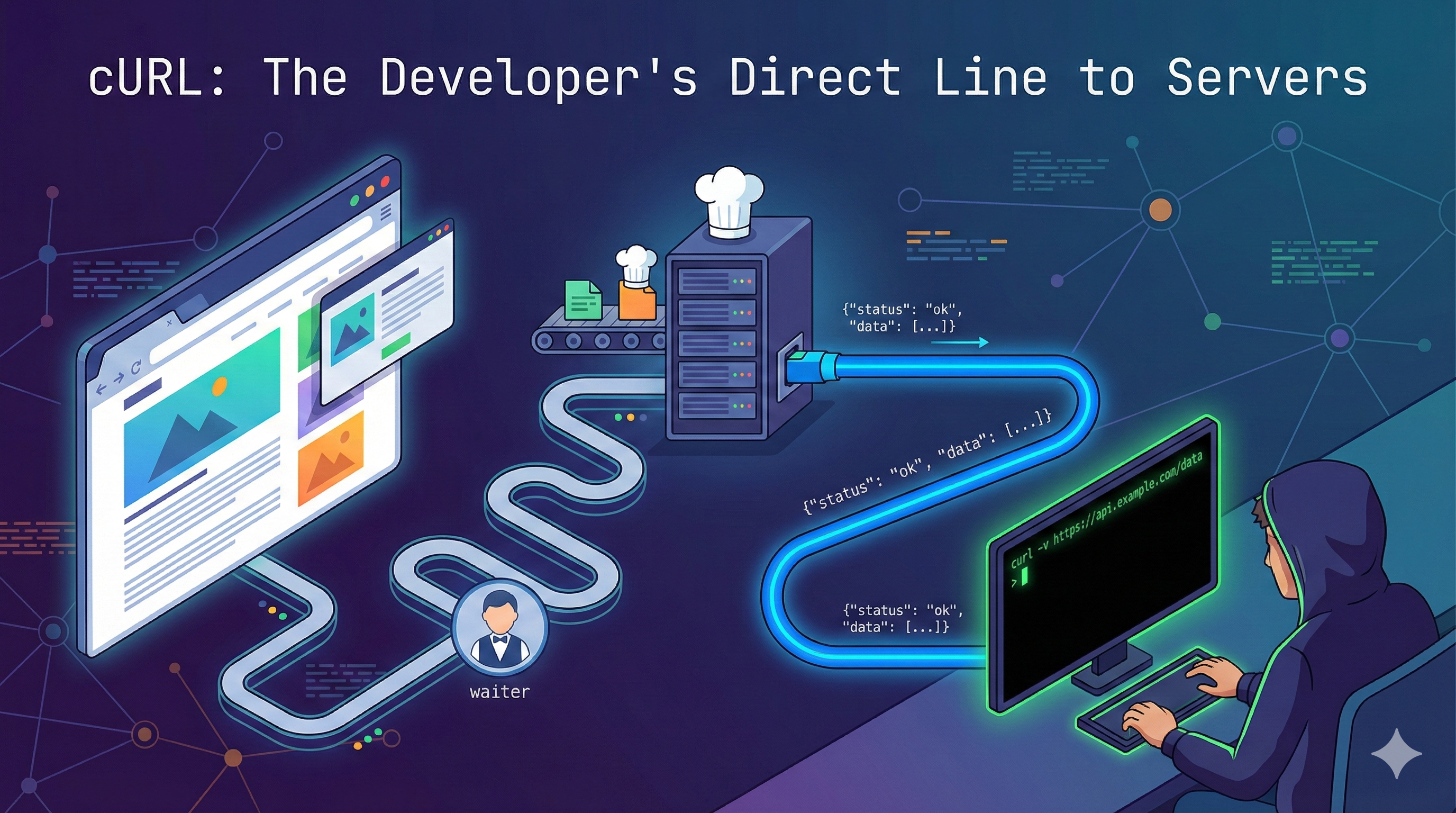
Every time you load a webpage, watch a video, or send a message, your device is having a conversation with another computer somewhere in the world. Usually, your browser handles this conversation for you, translating clicks and taps into requests and turning the responses into beautiful interfaces. But as a developer, you need to understand and control this conversation directly. That's where cURL comes in.
Understanding Servers: The Foundation
Before we talk about cURL, let's understand what we're actually talking to.
What is a Server?
A server is simply a computer that provides services or resources to other computers. When you visit a website, you're connecting to a web server. When you save a file to the cloud, you're talking to a file server. When you use an app on your phone, it's probably communicating with an application server.
Think of it like this: a server is like a restaurant kitchen. You (the client) place an order, and the kitchen (server) prepares your food and sends it back to you. You don't need to know how the kitchen works internally - you just need to know how to order.
The Client-Server Conversation
Every web interaction follows a request-response pattern:
Client (Your Computer)
      ↓
   [Request] → "Give me the homepage"
      ↓
   Server
      ↓
   [Response] ← "Here's the HTML, CSS, and images"
      ↓
Client (Renders the page)
Your browser is a client. It sends requests and processes responses. But what if you want to send requests without opening a browser? What if you want to automate this process, test your own server, or see the raw data without any visual rendering?
That's exactly why we need cURL.
What is cURL? (In Very Simple Terms)
cURL stands for "Client URL" (though some say it's just "curl"). It's a command-line tool that lets you transfer data to or from a server using various protocols like HTTP, HTTPS, FTP, and more.
Think of cURL as a messenger robot that you can send from your terminal to talk to servers. Unlike a browser, which is designed to make things look pretty for humans, cURL is designed to give developers raw, unfiltered access to server responses.
The Difference: Browser vs cURL
Let's visualize the difference:
Browser Request Flow:
You → Click a link
  → Browser formats the request
  → Browser adds cookies, headers, etc.
  → Browser sends request to server
  → Server responds
  → Browser parses HTML, CSS, JavaScript
  → Browser renders a beautiful page
  → You see: Pretty website
cURL Request Flow:
You → Type a curl command
  → cURL sends request exactly as you specify
  → Server responds
  → cURL prints raw response to terminal
→ You see: Raw HTML/JSON/dataAnalogy: If a browser is like dining at a restaurant (you get a nicely plated meal), cURL is like working in the kitchen (you see exactly what ingredients go in and how they're prepared).
Why Programmers Need cURL
You might be thinking: "I have a browser. Why complicate things with terminal commands?"
Here's why cURL is essential in a developer's toolkit:
1. Testing APIs Without a UI
When you build a backend API, you need to test it before building a frontend. cURL lets you send requests instantly from your terminal.
# Test your local API endpoint
curl http://localhost:3000/api/users
Instead of building a whole form just to test if your endpoint works, you can verify it in seconds with cURL.
2. Automation and Scripting
You can put cURL commands in scripts to automate repetitive tasks:
# Daily health check script
curl https://myapp.com/health
curl https://api.myapp.com/status
curl https://database.myapp.com/ping
Run this script every morning to check if all your services are up.
3. Debugging Production Issues
When something breaks in production, you need to see the raw server response without browser caching, extensions, or other interference. cURL gives you the truth.
4. No Graphical Overhead
cURL doesn't download images, doesn't execute JavaScript, doesn't render CSS. It just fetches data. This makes it:
- Fast
- Lightweight
- Perfect for servers (which don't have browsers)
- Great for CI/CD pipelines
5. Platform Independence
cURL works identically on Windows, macOS, and Linux. Your commands are portable across environments.
6. Learning HTTP Protocol
Using cURL forces you to understand how HTTP actually works - headers, methods, status codes, and request bodies. This knowledge makes you a better developer.
Making Your First Request
Enough theory. Let's get our hands dirty.
Installing cURL
Most systems come with cURL pre-installed. Check if you have it:
curl --versionIf you see version information, you're good to go. If not:
- macOS: Usually pre-installed. If not, install via Homebrew:
brew install curl - Linux:
sudo apt install curl(Ubuntu/Debian) orsudo yum install curl(RHEL/CentOS) - Windows: Comes with Windows 10+ or download from curl.se
The Simplest Request
Open your terminal and type:
curl https://chaicode.comHit enter. You'll see a wall of HTML code flood your terminal. Congratulations! You just made your first HTTP request using cURL.
What happened?
- cURL connected to chaicode.com's server
- It sent an HTTP GET request asking for the homepage
- The server responded with HTML
- cURL printed that HTML to your terminal
Making It Readable
Raw HTML is hard to read. Let's try fetching some JSON data instead:
curl https://jsonplaceholder.typicode.com/posts/1You'll see something like:
{
  "userId": 1,
  "id": 1,
  "title": "sunt aut facere repellat provident",
  "body": "quia et suscipit\nsuscipit..."
}
Much better! You just fetched data from a REST API - the same way your applications do it.
Understanding Request and Response
Every HTTP interaction has two parts: the request you send and the response you get back. Let's break down what's actually happening.
The HTTP Request Structure
When cURL sends a request, it includes several components:
GET /posts/1 HTTP/1.1          ← Request line (method, path, protocol)
Host: jsonplaceholder.typicode.com  ← Headers
User-Agent: curl/7.64.1
Accept: */*

[Request body - empty for GET requests]
Let's see this in action:
curl -v https://jsonplaceholder.typicode.com/posts/1The -v (verbose) flag shows you everything cURL sends and receives. You'll see:
>lines: What cURL sends to the server<lines: What the server sends back
The HTTP Response Structure
The server's response has three parts:
HTTP/1.1 200 OK                    ← Status line
Content-Type: application/json      ← Headers
Date: Mon, 20 Jan 2026 10:30:00 GMT
Content-Length: 292

{                                   ← Body (the actual data)
  "userId": 1,
  "id": 1,
  ...
}
HTTP Status Codes: What They Mean
The status code tells you if your request succeeded:
- 2xx (Success):
200 OK- Request succeeded201 Created- Resource was created successfully
- 3xx (Redirection):
301 Moved Permanently- Resource moved to new URL304 Not Modified- Cached version is still valid
- 4xx (Client Error):
400 Bad Request- Your request was malformed401 Unauthorized- You need to authenticate404 Not Found- Resource doesn't exist
- 5xx (Server Error):
500 Internal Server Error- Server crashed503 Service Unavailable- Server is down or overloaded
Check just the status code:
curl -I https://www.google.comThe -I flag fetches headers only (no body), which includes the status code.
Using cURL to Talk to APIs
Modern web development revolves around APIs - Application Programming Interfaces. These are servers that speak in data (usually JSON) rather than HTML. Let's learn how to interact with them.
The GET Request: Fetching Data
GET is the default HTTP method. It's used to retrieve information without modifying anything on the server.
Basic GET request:
curl https://api.github.com/users/atharvdange618This fetches my github user data.
GET with query parameters:
APIs often accept parameters to filter or customize responses:
curl "https://api.github.com/search/repositories?q=javascript&sort=stars"Note the quotes around the URL. This is crucial when URLs contain special characters like &, ?, or =.
Why quotes matter:
# WRONG - shell interprets & as background process
curl https://api.com?name=john&age=25

# RIGHT - quotes protect the URL
curl "https://api.com?name=john&age=25"
The POST Request: Sending Data
POST is used to send data to the server, typically to create new resources.
Basic POST with data:
curl -X POST -d "title=Hello World&body=This is my post" \
  https://jsonplaceholder.typicode.com/posts
Let's break this down:
-X POST: Specifies the HTTP method-d: Sends data (the-dflag automatically sets method to POST, so-X POSTis optional here)
POST with JSON:
Most modern APIs expect JSON. Here's how to send it:
curl -X POST \
  -H "Content-Type: application/json" \
  -d '{"title":"Hello","body":"World"}' \
https://jsonplaceholder.typicode.com/posts-H: Adds a headerContent-Type: application/json: Tells server you're sending JSON- The data is wrapped in single quotes to preserve the JSON structure
Authentication: Sending Credentials
Many APIs require authentication. Here are common patterns:
Basic authentication:
curl -u username:password https://api.example.com/dataBearer token (JWT):
curl -H "Authorization: Bearer YOUR_TOKEN_HERE" \
  https://api.example.com/protected
API Key in header:
curl -H "X-API-Key: your-api-key" \
  https://api.example.com/data
Saving Responses to Files
Instead of printing to terminal, save responses:
# Using -o (output) flag
curl -o response.json https://api.github.com/users/atharvdange618

# Using -O (capital O) - saves with remote filename
curl -O https://example.com/file.pdf
Following Redirects
Some URLs redirect to other locations. Use -L to follow them:
curl -L https://github.comWithout -L, cURL stops at the redirect and you get the redirect response instead of the final page.
Common Mistakes Beginners Make
Learning from others' mistakes is faster than making them yourself. Here are the most common cURL pitfalls:
1. Forgetting the Protocol
# WRONG
curl google.com

# RIGHT
curl https://google.com
cURL needs to know what protocol to use. Always include http:// or https://.
2. Unquoted URLs with Special Characters
# WRONG - shell breaks on &
curl https://api.com/search?q=javascript&sort=stars

# RIGHT
curl "https://api.com/search?q=javascript&sort=stars"
Characters like &, ?, =, #, and spaces have special meaning in shells. Quote your URLs.
3. Mismatched or Unclosed Quotes
# WRONG - unclosed quote
curl -d '{"name": "John}'

# RIGHT
curl -d '{"name": "John"}'
If you start with a single quote, you must end with a single quote. If you start with double quotes, end with double quotes.
Pro tip: Use single quotes for JSON to avoid escaping double quotes inside the JSON.
4. Ignoring Status Codes
curl https://api.example.com/endpointJust because cURL doesn't show an error doesn't mean the request succeeded. The server might have returned a 404 or 500. Always check:
curl -w "\nHTTP Status: %{http_code}\n" https://api.example.com/endpointThe -w flag adds custom output formatting. %{http_code} prints the HTTP status code.
5. Not Checking Verbose Output
When something doesn't work, don't guess. Use verbose mode:
curl -v https://api.example.com/endpointThis shows you:
- DNS resolution
- Connection details
- SSL handshake (for HTTPS)
- Full request headers
- Full response headers
6. Forgetting Content-Type Headers
# WRONG - server doesn't know you're sending JSON
curl -X POST -d '{"name":"John"}' https://api.com/users

# RIGHT
curl -X POST \
  -H "Content-Type: application/json" \
  -d '{"name":"John"}' \
  https://api.com/users
Servers need the Content-Type header to parse your data correctly.
7. Using GET When You Need POST
# This sends data but uses GET (won't work as expected)
curl "https://api.com/create?name=John&email=john@example.com"

# This properly sends data with POST
curl -X POST \
  -d "name=John&email=john@example.com" \
  https://api.com/create
GET requests should fetch data. POST, PUT, PATCH, DELETE should modify data.
8. Not Handling Spaces in Data
# WRONG - shell breaks on spaces
curl -d title=Hello World https://api.com/posts

# RIGHT
curl -d "title=Hello World" https://api.com/posts
Where cURL Fits in Backend Development
Now that you know how to use cURL, let's understand its role in modern development workflows.
Testing Your Own APIs
When building a REST API, cURL is your first testing tool:
# Start your server locally
npm start

# In another terminal, test endpoints
curl http://localhost:3000/api/health
curl http://localhost:3000/api/users
curl -X POST -H "Content-Type: application/json" \
  -d '{"name":"Test"}' http://localhost:3000/api/users
This is faster than:
- Building a frontend
- Opening Postman
- Writing automated tests
CI/CD Pipelines
In deployment scripts, cURL verifies services are healthy:
# deploy.sh
echo "Deploying application..."
# ... deployment code ...

echo "Checking if service is up..."
STATUS=$(curl -s -o /dev/null -w "%{http_code}" https://myapp.com/health)

if [ $STATUS -eq 200 ]; then
  echo "Deployment successful!"
else
  echo "Deployment failed - service not responding"
  exit 1
fi
Monitoring and Alerting
Check if your services are alive:
# healthcheck.sh
curl -f https://api.myapp.com/health || \
  curl -X POST https://slack.com/webhook \
  -d '{"text":"API is down!"}'
The -f flag makes cURL exit with error code on HTTP errors, which triggers the alert.
Webhooks and Integration Testing
Trigger webhooks manually:
curl -X POST https://myapp.com/webhooks/github \
  -H "Content-Type: application/json" \
  -d '{"event":"push","repository":"myrepo"}'
Downloading and Uploading Files
# Download a file
curl -O https://example.com/file.zip

# Upload a file
curl -X POST -F "file=@document.pdf" \
  https://api.example.com/upload
Practical Examples: Putting It All Together
Let's work through real-world scenarios.
Example 1: Testing a Login Endpoint
# Send login credentials
curl -X POST \
  -H "Content-Type: application/json" \
  -d '{"email":"user@example.com","password":"secret"}' \
  https://api.example.com/login

# Response might include a token
{
  "token": "eyJhbGciOiJIUzI1NiIsInR5cCI6IkpXVCJ9...",
  "user": {"id": 1, "email": "user@example.com"}
}

# Use that token in subsequent requests
curl -H "Authorization: Bearer eyJhbGciOiJIUzI1NiIsInR5cCI6IkpXVCJ9..." \
  https://api.example.com/profile
Example 2: Creating a GitHub Issue
curl -X POST \
  -H "Authorization: token YOUR_GITHUB_TOKEN" \
  -H "Content-Type: application/json" \
  -d '{"title":"Bug report","body":"Something is broken"}' \
  https://api.github.com/repos/username/repo/issues
Example 3: Weather API Query
curl "https://api.openweathermap.org/data/2.5/weather?q=London&appid=YOUR_API_KEY"Example 4: Testing Rate Limits
# Make 10 requests and see when you get rate limited
for i in {1..10}; do
  echo "Request $i:"
  curl -w "Status: %{http_code}\n" \
    -H "Authorization: Bearer TOKEN" \
    https://api.example.com/data
  echo "---"
done
Beyond the Basics: Next Steps
Once you're comfortable with basic cURL, explore these advanced features:
Custom Headers
curl -H "User-Agent: MyApp/1.0" \
  -H "Accept-Language: en-US" \
  https://api.example.com
Cookies
# Save cookies
curl -c cookies.txt https://example.com/login

# Use saved cookies
curl -b cookies.txt https://example.com/dashboard
Timeouts
# Fail if connection takes longer than 5 seconds
curl --connect-timeout 5 https://slow-server.com
Retry Logic
# Retry up to 3 times with 2-second intervals
curl --retry 3 --retry-delay 2 https://unreliable-api.com
The Big Picture
cURL is more than just a tool - it's a window into how the internet actually works. Every time you use it, you're operating at the same level as browsers, mobile apps, and IoT devices. You're speaking HTTP directly.
Understanding cURL makes you better at:
- Debugging API issues
- Writing backend services
- Understanding frontend-backend communication
- Troubleshooting network problems
- Reading API documentation
- Building automation scripts
It's one of those tools that seems simple on the surface but has incredible depth. You can spend five minutes learning the basics or five years mastering every flag and option - and both are time well spent.
Quick Reference Cheat Sheet
# Basic GET
curl https://api.example.com/data

# GET with headers
curl -H "Authorization: Bearer TOKEN" https://api.example.com/data

# POST with JSON
curl -X POST \
  -H "Content-Type: application/json" \
  -d '{"key":"value"}' \
  https://api.example.com/data

# POST with form data
curl -X POST -d "name=John&age=30" https://api.example.com/form

# Save response to file
curl -o output.json https://api.example.com/data

# Show only headers
curl -I https://api.example.com

# Follow redirects
curl -L https://example.com

# Verbose output (debugging)
curl -v https://api.example.com

# Show HTTP status code
curl -w "\nHTTP: %{http_code}\n" https://api.example.com

# Upload file
curl -X POST -F "file=@document.pdf" https://api.example.com/upload
Final Thoughts
When I first started learning backend development, cURL felt intimidating. All those flags, the raw output, the terminal commands - it seemed unnecessary when I could just use a browser or Postman. But here's what I learned: cURL teaches you to think like a server.
It strips away all the visual sugar and forces you to understand the underlying protocol. Once you get comfortable with cURL, you'll find yourself reaching for it constantly. It becomes second nature.
Start simple. Make a GET request. Then try POST. Gradually add headers and authentication. Before you know it, you'll be debugging production issues, writing deployment scripts, and testing APIs like a pro - all from the comfort of your terminal.
The internet is just computers talking to each other. Now you know how to join the conversation.