Map and Set in JavaScript: The Modern Way to Store Data
Learn when and how to use JavaScript's Map and Set data structures.
Map and Set are powerful JavaScript data structures that solve common problems with Objects and Arrays. Map provides efficient key-value storage with any data type as keys, while Set automatically handles unique values without manual checking.
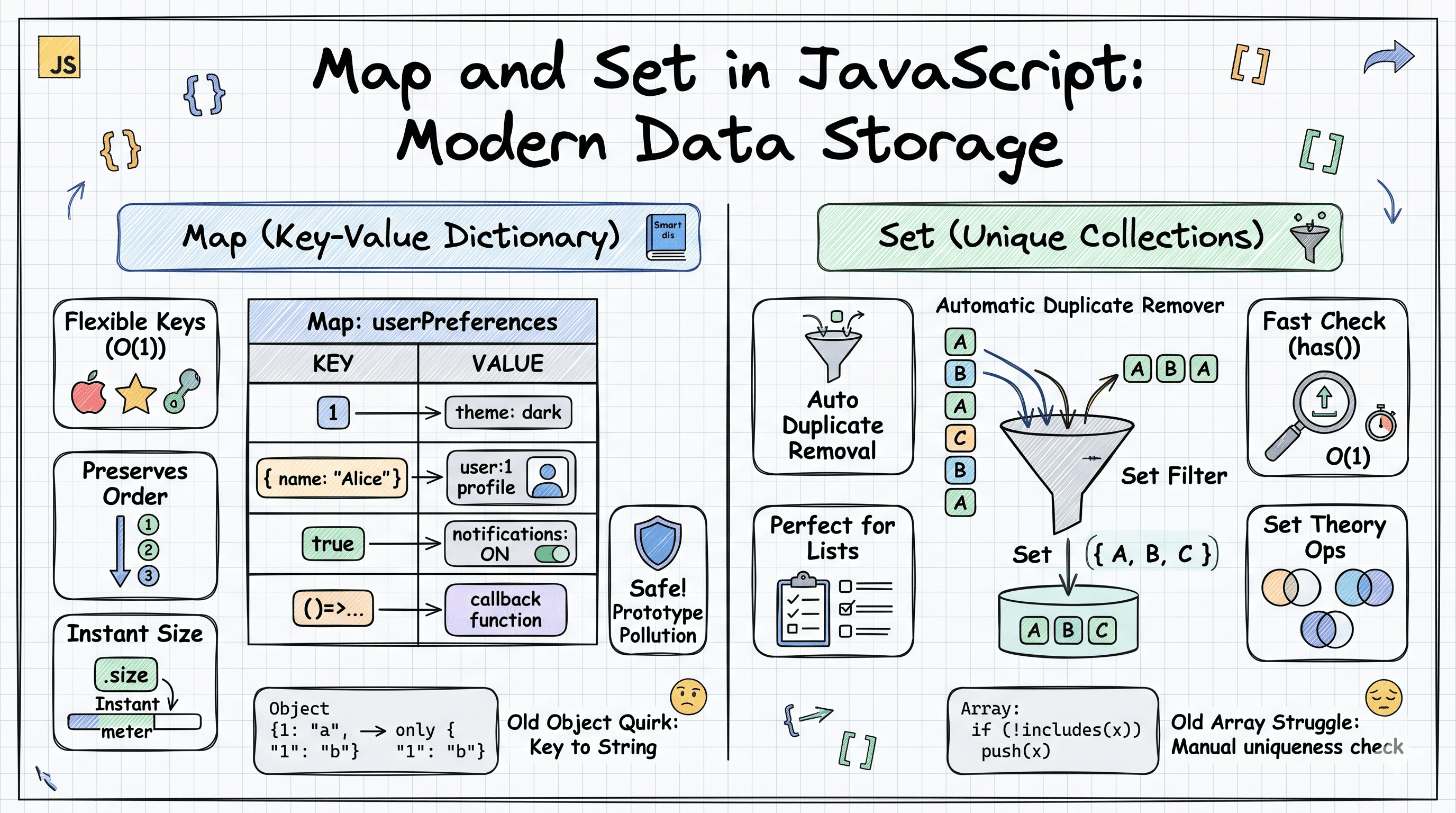
Think of your kitchen pantry. You might organize spices in a labeled rack where each label points to exactly one spice container (that's a Map), and you have a fruit bowl where you never want duplicate fruits sitting around (that's a Set). JavaScript's Map and Set work similarly: they're specialized storage containers designed for specific use cases that regular objects and arrays struggle with.
The Problem with Traditional Storage
Before diving into Map and Set, let's understand why JavaScript needed these in the first place.
When you use a plain object for key-value storage, you run into some quirks:
const userScores = {};
userScores[1] = 100; // Number key
userScores["1"] = 200; // String key

console.log(userScores); // { '1': 200 } - Only one entry!
The number 1 and string "1" became the same key because objects automatically convert all keys to strings. It's like having a filing cabinet that converts all your folder labels to uppercase: you lose important distinctions.
For arrays used to track unique items, you end up writing repetitive checking code:
const tags = [];

function addTag(tag) {
  if (!tags.includes(tag)) {
    // Manual uniqueness check
    tags.push(tag);
  }
}

addTag("javascript");
addTag("react");
addTag("javascript"); // Need to check every time!
console.log(tags); // ["javascript", "react"]
This works, but it's verbose and inefficient. Every check scans the entire array, making it slower as your data grows.
What is Map?
Map is like a smart dictionary where you can use anything as a key: numbers, objects, functions, even other Maps. Unlike objects that stringify keys, Map preserves the exact type and identity.
const userPreferences = new Map();

// Any type can be a key
userPreferences.set(1, "theme: dark"); // Number key
userPreferences.set("1", "theme: light"); // String key
userPreferences.set(true, "notifications: on"); // Boolean key

console.log(userPreferences.get(1)); // "theme: dark"
console.log(userPreferences.get("1")); // "theme: light"
console.log(userPreferences.size); // 3 - All distinct keys
Here's how Map's internal structure works:
┌─────────────────────────────────────────┐
│           Map: userPreferences          │
├──────────────┬──────────────────────────┤
│     Key      │         Value            │
├──────────────┼──────────────────────────┤
│   1 (num)    │   "theme: dark"          │
│   "1" (str)  │   "theme: light"         │
│   true (bool)│   "notifications: on"    │
└──────────────┴──────────────────────────┘
       ↑                  ↑
    Preserves         Any type
    exact type        can be value
Map maintains insertion order, meaning when you iterate over it, you get entries back in the same sequence you added them. This is crucial for predictable behavior.
Advanced Map Features
Map comes with built-in methods that make data manipulation cleaner:
const cache = new Map();

// Setting multiple values
cache.set("user:1", { name: "Alice" });
cache.set("user:2", { name: "Bob" });

// Checking existence (faster than object hasOwnProperty)
console.log(cache.has("user:1")); // true

// Iterating with forEach
cache.forEach((value, key) => {
  console.log(`${key}: ${value.name}`);
});

// Destructuring in for-of loops
for (const [key, value] of cache) {
  console.log(key, value);
}

// Getting size (O(1) operation, instant)
console.log(cache.size); // 2

// Clearing all entries
cache.clear();
Note on Performance Notation: When you see O(1) or O(n), this describes how fast an operation is. Think of it like this:
- O(1) means "instant" or "constant time": no matter if you have 10 items or 10 million items, it takes the same amount of time (like looking at a clock).
- O(n) means "proportional to size": if you double your items, the operation takes roughly twice as long (like counting all items in a list one by one). These notations help us compare performance, especially with large datasets.
Because Map tracks its size internally, getting the count is instant. With objects, you'd need Object.keys(obj).length, which creates an array and counts it each time.
What is Set?
Set is your automatic duplicate remover. It's a collection that only stores unique values, no matter how many times you try to add the same thing.
Think of it like a VIP guest list for an exclusive event: once someone's name is on the list, adding it again doesn't create a duplicate entry. The bouncer (Set) just ignores the duplicate attempt.
const uniqueVisitors = new Set();

uniqueVisitors.add("Alice");
uniqueVisitors.add("Bob");
uniqueVisitors.add("Alice"); // Ignored silently
uniqueVisitors.add("Alice"); // Still ignored

console.log(uniqueVisitors); // Set { "Alice", "Bob" }
console.log(uniqueVisitors.size); // 2
Here's how Set handles uniqueness:
Attempting to add: ["Alice", "Bob", "Alice", "Charlie", "Bob"]

         ┌──────────────────┐
         │   Set Storage    │
         ├──────────────────┤
Add ───► │  "Alice"   ✓     │  (Added)
Add ───► │  "Bob"     ✓     │  (Added)
Add ───► │  "Alice"   ✗     │  (Already exists, ignored)
Add ───► │  "Charlie" ✓     │  (Added)
Add ───► │  "Bob"     ✗     │  (Already exists, ignored)
         └──────────────────┘

Final Set: ["Alice", "Bob", "Charlie"]
Set determines uniqueness using the same algorithm as strict equality (===), with one exception: NaN is considered equal to NaN (even though NaN === NaN returns false in regular JavaScript).
Practical Set Operations
Set shines when you need to remove duplicates from arrays or perform set theory operations:
// Instant deduplication
const numbers = [1, 2, 2, 3, 4, 4, 5];
const uniqueNumbers = [...new Set(numbers)];
console.log(uniqueNumbers); // [1, 2, 3, 4, 5]

// Checking membership (very fast)
const allowedRoles = new Set(["admin", "editor", "viewer"]);
console.log(allowedRoles.has("admin")); // true
console.log(allowedRoles.has("hacker")); // false

// Set operations (Union, Intersection, Difference)
const setA = new Set([1, 2, 3]);
const setB = new Set([2, 3, 4]);

// Union: all unique values from both
const union = new Set([...setA, ...setB]);
console.log(union); // Set { 1, 2, 3, 4 }

// Intersection: common values
const intersection = new Set([...setA].filter((x) => setB.has(x)));
console.log(intersection); // Set { 2, 3 }

// Difference: in A but not in B
const difference = new Set([...setA].filter((x) => !setB.has(x)));
console.log(difference); // Set { 1 }
For advanced use cases, checking membership with has() is significantly faster than array.includes() for large datasets because Set uses hash-based lookup (approximately O(1) - instant) instead of linear scanning (O(n) - checking each item one by one).
To put this in perspective: checking if an item exists in a Set with 1 million items takes roughly the same time as checking in a Set with 10 items. With an array, checking 1 million items means potentially looking through all 1 million one by one.
Map vs Object: When to Use Which?
Understanding the differences helps you choose the right tool:
┌─────────────────────────────────────────────────────────────┐
│                    Map vs Object                            │
├─────────────────┬────────────────────┬──────────────────────┤
│   Aspect        │   Object           │   Map                │
├─────────────────┼────────────────────┼──────────────────────┤
│ Key types       │ Strings/Symbols    │ Any type             │
│ Key order       │ Complex*           │ Insertion order      │
│ Size property   │ Manual (keys.len)  │ Built-in (.size)     │
│ Iteration       │ for-in, keys()     │ for-of, forEach()    │
│ Performance     │ Not optimized      │ Optimized for add/   │
│                 │ for frequent       │ delete operations    │
│                 │ additions/deletes  │                      │
│ Prototype       │ Has prototype      │ No default keys      │
│                 │ (may clash)        │                      │
│ JSON support    │ Native             │ Manual conversion    │
└─────────────────┴────────────────────┴──────────────────────┘

* Objects maintain insertion order for string keys in modern JS,
  but the rules are complex with number keys and symbols
Use Object when:
- You need JSON serialization (
JSON.stringifyworks directly) - You're storing fixed configuration or structured data
- You need property access syntax (
obj.keyinstead ofmap.get(key)) - You're working with data from APIs (typically returns objects)
Use Map when:
- Keys are not strings (objects, numbers, functions)
- You frequently add/remove entries
- You need guaranteed insertion order
- You need to track size efficiently
- Keys might conflict with Object prototype properties
// Dangerous with Object:
const userInput = {};
userInput["__proto__"] = "hacked"; // Potential prototype pollution

// Safe with Map:
const userData = new Map();
userData.set("__proto__", "safe"); // Just another key
Set vs Array: Understanding the Trade-offs
┌─────────────────────────────────────────────────────────────┐
│                    Set vs Array                             │
├─────────────────┬────────────────────┬──────────────────────┤
│   Aspect        │   Array            │   Set                │
├─────────────────┼────────────────────┼──────────────────────┤
│ Duplicates      │ Allowed            │ Auto-removed         │
│ Order           │ Index-based        │ Insertion order      │
│ Access method   │ arr[index]         │ Iterate or has()     │
│ Search speed    │ O(n) - includes()  │ O(1) - has()         │
│ Use case        │ Ordered lists      │ Unique collections   │
│ Modification    │ push, pop, splice  │ add, delete, clear   │
└─────────────────┴────────────────────┴──────────────────────┘
Use Array when:
- Order matters and you need index access
- You allow duplicate values
- You need array methods like
map(),filter(),reduce() - You're storing a sequence or list
Use Set when:
- You need uniqueness guarantees
- You perform frequent membership checks
- You want to remove duplicates
- You're implementing set theory operations
// Array approach - slower for large datasets
function hasPermission(user, requiredPermissions) {
  return requiredPermissions.every(
    user.permissions.includes(perm), // O(n): scans entire array each time
  );
}

// Set approach - faster
function hasPermission(user, requiredPermissions) {
  const userPerms = new Set(user.permissions);
  return requiredPermissions.every(
    (perm) => userPerms.has(perm), // O(1): instant lookup
  );
}
When to Use Map and Set in Real Applications
Map Use Cases:
- Caching function results (memoization)
const cache = new Map();

function expensiveOperation(input) {
  if (cache.has(input)) {
    return cache.get(input);  // Return cached result
  }

  const result = /* complex calculation */;
  cache.set(input, result);
  return result;
}- Storing metadata about objects
const elementMetadata = new Map();
const button = document.querySelector("#btn");

elementMetadata.set(button, {
  clickCount: 0,
  lastClicked: null,
});- Grouping data by non-string keys
const usersByAge = new Map();
usersByAge.set(25, [{ name: "Alice" }, { name: "Bob" }]);
usersByAge.set(30, [{ name: "Charlie" }]);
Set Use Cases:
- Removing duplicates from arrays
const uniqueTags = [...new Set(blogPost.tags)];- Tracking visited items
const visitedPages = new Set();
visitedPages.add(window.location.pathname);

if (visitedPages.has("/about")) {
  console.log("User has been to about page");
}- Implementing features requiring uniqueness
class ShoppingCart {
  constructor() {
    this.items = new Set();
  }

  addItem(productId) {
    this.items.add(productId); // No duplicate products
  }
}
Key Takeaways
Map and Set are not replacements for Objects and Arrays but rather complementary tools for specific scenarios:
- Map excels when you need a true key-value store with non-string keys, frequent additions/deletions, or when you want to avoid prototype pollution issues
- Set is your go-to for maintaining unique collections and performing fast membership checks
- Objects remain perfect for structured data, JSON compatibility, and traditional property access patterns
- Arrays are still essential for ordered lists, index-based access, and leveraging array methods
The key is recognizing when the specialized behavior of Map and Set simplifies your code and improves performance. Start using them when you find yourself working around Object or Array limitations, and you'll write cleaner, more efficient JavaScript.