Async Code in Node.js: Callbacks and Promises
Learn how async code works in Node.js, why callbacks exist, the callback hell problem, and how promises solve it with cleaner chaining and error handling.
Node.js runs on a single thread, yet it handles thousands of operations at once. Understanding how callbacks and promises make that possible is one of the most important milestones in becoming a confident Node.js developer.
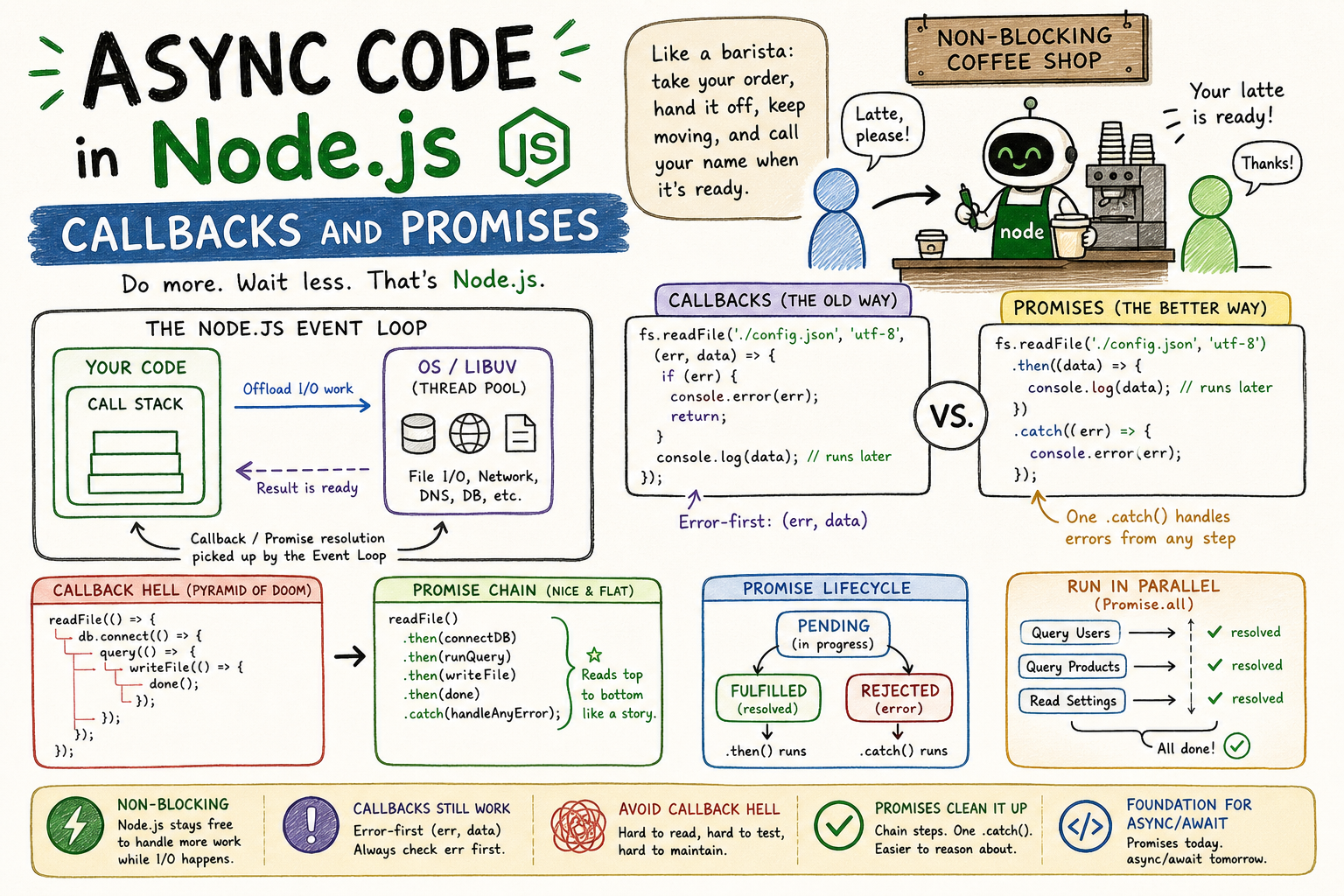
Imagine you walk into a coffee shop and order a latte. The barista doesn't freeze in place until your drink is ready and then serve every other customer. They take your order, hand it off, and immediately move to the next person. When your drink is done, they call your name. That handoff and "call your name when ready" part is exactly how async code works in Node.js.
Why Async Code Exists in Node.js
Node.js is single-threaded. There is one call stack, one execution context, and one thread doing all the work. So what happens when your app needs to read a file, query a database, and make an HTTP request all at once?
If Node.js worked synchronously like a cashier who refuses to move until every task is fully done, your server would grind to a halt the moment it hit a slow I/O operation. A database query that takes 200ms would block every other request behind it.
The solution is the event loop. Node.js offloads I/O work to the operating system (or a thread pool for certain operations), continues executing other code, and then picks up the result when the OS signals it is done.
  Your Code
     │
     ▼
┌────────────┐     Offload I/O work     ┌──────────────┐
│ Call Stack │ ──────────────────────►  │  OS / libuv  │
└────────────┘                          └──────┬───────┘
     ▲                                         │
     │          Result is ready                │
     │  ◄──────────────────────────────────────┘
  Callback / Promise resolution
  picked up by the Event Loop
That is the big picture. The call stack stays free to handle more work while slow tasks run elsewhere. When the result comes back, the event loop picks it up and runs the associated code.
Here is what that looks like in practice. A synchronous file read blocks everything:
const fs = require("fs");

// This blocks the entire thread until the file is read
const data = fs.readFileSync("./config.json", "utf-8");
console.log(data);
console.log("This runs AFTER the file is read");
An async read does not:
const fs = require("fs");

fs.readFile("./config.json", "utf-8", (err, data) => {
  console.log(data); // runs later
});

console.log("This runs IMMEDIATELY, before the file is even read");
That last console.log running first surprises a lot of beginners. But once you understand what Node.js is doing underneath, it makes complete sense.
Callbacks: The Original Async Pattern
A callback is just a function you pass to another function, asking it to call you back when the work is done. That is it. The pattern predates Node.js entirely, but Node.js made it the foundation of its async model.
Let us walk through file reading step by step.
const fs = require("fs");

fs.readFile("./user-data.json", "utf-8", function (err, data) {
  if (err) {
    console.error("Failed to read file:", err.message);
    return;
  }
  console.log("File contents:", data);
});
Here is what happens in order:
Step 1: fs.readFile() is called
        Node.js registers the callback and offloads file I/O to the OS
             │
             ▼
Step 2: Node.js moves on. Other code runs.
             │
             ▼
Step 3: OS finishes reading the file
        Event loop picks up the result
             │
             ▼
Step 4: Your callback is called with (err, data)
        Error-first: if something went wrong, err is set
        If all good, data has the file contents
The error-first convention is important. In Node.js callback APIs, the first argument is always the error object (or null if there was no error), and the second argument is the result. This is a community-wide standard. Breaking it is a great way to confuse everyone who works with your code.
// Correct: check err before using data
fs.readFile("./config.json", "utf-8", (err, data) => {
  if (err) {
    // handle error and return early
    return;
  }
  // safe to use data here
});
For a single operation, callbacks are clean and easy to follow. The real problems start when you need to chain multiple async operations together.
The Callback Hell Problem
Say you need to: read a config file, then use the config to connect to a database, then run a query, then write the result to another file. Each step depends on the previous one. With callbacks, that looks like this:
fs.readFile("./config.json", "utf-8", (err, configData) => {
  if (err) return handleError(err);

  const config = JSON.parse(configData);

  db.connect(config.dbUrl, (err, connection) => {
    if (err) return handleError(err);

    connection.query("SELECT * FROM users", (err, users) => {
      if (err) return handleError(err);

      fs.writeFile("./output.json", JSON.stringify(users), (err) => {
        if (err) return handleError(err);

        console.log("Done!");
      });
    });
  });
});
Each async step pushes your actual logic one level deeper. This is callback hell. Also called the pyramid of doom because of the triangular shape it creates.
Callback Hell Structure:

readFile(callback1)
  └── db.connect(callback2)
        └── query(callback3)
              └── writeFile(callback4)
                    └── done
The problems here are real:
First, error handling is duplicated at every level. You handle errors four times for four operations.
Second, the code reads like a spiral inward, not like a sequence of steps. It is hard to scan and understand at a glance.
Third, if you need to add a fifth step, you go one level deeper. The indentation never stops.
And fourth, testing any individual step in isolation becomes painful.
This is not a stylistic complaint. Deeply nested callbacks are a genuine maintainability problem. The community felt this pain for years before a better solution stabilized.
Promises: A Cleaner Contract
A Promise is an object representing the eventual result of an async operation. It has three states and it can only ever move forward, never backward.
Promise Lifecycle:

             ┌─────────────┐
             │   PENDING   │  ← Initial state, operation in progress
             └──────┬──────┘
                    │
          ┌─────────┴──────────┐
          │                    │
          ▼                    ▼
  ┌──────────────┐    ┌──────────────────┐
  │  FULFILLED   │    │    REJECTED      │
  │  (resolved)  │    │  (error thrown)  │
  └──────┬───────┘    └────────┬─────────┘
         │                     │
         ▼                     ▼
      .then()               .catch()
    handler runs          handler runs
Once a promise settles (either fulfilled or rejected), it stays that way. You cannot resolve a promise twice. You cannot flip a rejected promise back to pending. That immutability makes async code much easier to reason about.
Here is the same file reading example using the promise-based fs.promises API:
const fs = require("fs").promises;

fs.readFile("./config.json", "utf-8")
  .then((data) => {
    console.log("File contents:", data);
  })
  .catch((err) => {
    console.error("Failed to read file:", err.message);
  });
Cleaner already. Now let us tackle the chained operations problem that destroyed callbacks:
const fs = require("fs").promises;

fs.readFile("./config.json", "utf-8")
  .then((configData) => {
    const config = JSON.parse(configData);
    return db.connect(config.dbUrl); // return the next promise
  })
  .then((connection) => {
    return connection.query("SELECT * FROM users");
  })
  .then((users) => {
    return fs.writeFile("./output.json", JSON.stringify(users));
  })
  .then(() => {
    console.log("Done!");
  })
  .catch((err) => {
    // one catch handles errors from ANY step above
    console.error("Something went wrong:", err.message);
  });
The difference is significant. Instead of spiraling inward, this reads like a vertical sequence of steps. Each .then() receives the resolved value from the previous one. One .catch() at the bottom handles errors from any step in the chain.
Promise Chain vs Callback Hell:

CALLBACKS                          PROMISES
──────────                         ────────
op1(                               op1()
  op2(                               .then(op2)
    op3(                             .then(op3)
      op4(                           .then(op4)
        done                         .then(done)
      )                              .catch(handleAnyError)
    )
  )
)
The horizontal drift of callbacks vs the vertical, linear flow of promises is not just cosmetic. It directly affects how quickly you can scan and understand what a piece of code actually does.
Creating Your Own Promises
You will often work with existing APIs that already return promises (fetch, Axios, most modern database clients). But knowing how to create one from scratch is essential.
function readFileAsync(filePath) {
  return new Promise((resolve, reject) => {
    fs.readFile(filePath, "utf-8", (err, data) => {
      if (err) {
        reject(err); // operation failed
      } else {
        resolve(data); // operation succeeded
      }
    });
  });
}

readFileAsync("./config.json")
  .then((data) => console.log(data))
  .catch((err) => console.error(err));
The Promise constructor takes an executor function with two arguments: resolve and reject. Call resolve(value) when the work succeeds and reject(error) when it fails. That is the whole contract.
One subtle thing worth knowing: if you throw inside a .then() handler, the promise chain automatically catches it and routes to the nearest .catch(). You do not need to manually call reject inside handlers.
fetchUserData(userId)
  .then((user) => {
    if (!user) throw new Error("User not found"); // automatically caught
    return processUser(user);
  })
  .catch((err) => {
    // catches both fetchUserData rejections AND the thrown error above
    console.error(err);
  });
Promise.all: Running Operations in Parallel
One thing callbacks cannot express cleanly is "run these three things at the same time and wait for all of them." Promises make this straightforward.
const [users, products, settings] = await Promise.all([
  db.query("SELECT * FROM users"),
  db.query("SELECT * FROM products"),
  fs.readFile("./settings.json", "utf-8"),
]);
Promise.all takes an array of promises and returns a single promise that resolves when every promise in the array resolves. If any one of them rejects, the whole thing rejects immediately.
Promise.all Flow:

Promise A ──────────────────► resolved ──────────┐
Promise B ───────────────────────────► resolved ─┤──► All done
Promise C ──────────► resolved ──────────────────┘

If ANY rejects:
Promise A ──────────────────► resolved ─┐
Promise B ──► REJECTED ─────────────────┴──► .catch() fires immediately
Promise C     (still running but result ignored)
There are also Promise.allSettled (waits for all, regardless of rejections), Promise.race (resolves/rejects as soon as the first one settles), and Promise.any (resolves when the first one fulfills). Each has a specific use case, but Promise.all covers 80% of real-world parallel async needs.
Benefits of Promises Over Callbacks
Let us be concrete about why promises won:
Chaining without nesting. Returning a promise from a .then() handler automatically chains it. The pyramid collapses into a flat sequence.
Centralized error handling. One .catch() covers the entire chain. With callbacks, every level needs its own error check.
Composability. Promises are first-class objects you can store in variables, pass around, and combine. Callbacks are closures trapped inside function calls.
Better mental model. A promise is a value that represents a future result. You can think about it like any other value in your code.
Foundation for async/await. Async/await, which you are likely already using, is syntactic sugar built entirely on top of promises. You cannot use await on a callback-based API. You need a promise.
Key Takeaways
Node.js is non-blocking by design. Async code is not a quirk, it is the core of what makes Node.js fast for I/O-heavy applications.
Callbacks were the original solution and they still work. They are built into the Node.js core APIs and you will encounter them. The error-first convention matters: always check the first argument before using the second.
Callback hell is a real problem, not just a style preference. Deeply nested callbacks are harder to read, harder to test, and harder to maintain.
Promises solve the nesting problem with .then() chaining and consolidate error handling into a single .catch(). Creating your own promises with new Promise() is how you wrap callback-based APIs when you need to.
And when you are ready: everything you learn about promises directly transfers to async/await, because under the hood, they are the same thing.